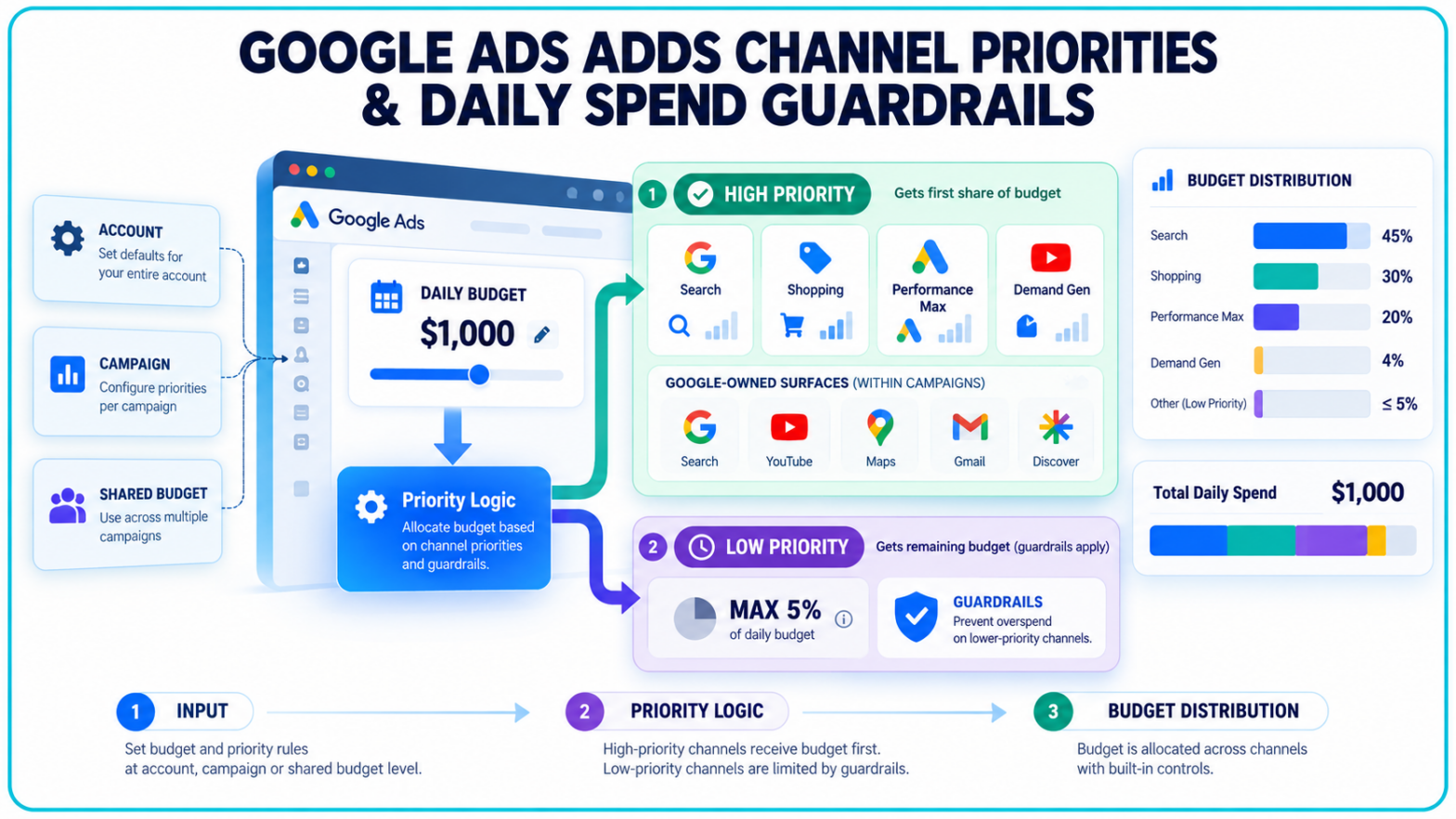
Google’s automated campaigns no longer have an entirely free hand in deciding where every advertising dollar goes. New channel priorities and budget allocations let advertisers fund preferred inventory first while placing daily guardrails around lower-priority channels.
The optional controls begin rolling out globally on October 15, 2026, across Search, Shopping, Performance Max and Demand Gen, although availability will vary by account and campaign type over the coming months.
High-Priority Inventory Gets First Claim on the Budget
Under the new system, advertisers can classify eligible channels as either High priority or Low priority. Google will direct spend toward High-priority inventory first, then use remaining budget on lower-priority channels when campaign settings, eligible traffic and performance targets permit.
All channels are set to High priority by default.
The available choices depend on the campaign type:
- Search campaigns separate Google Search, search partners and the Google Display Network.
- Shopping campaigns separate Google Search and search partners.
- Performance Max separates “Google channels,” search partners and the Google Display Network.
- Demand Gen separates Google channels and the Google Display Network.
For Performance Max and Demand Gen, “Google channels” remains a broad grouping covering Search, YouTube, Maps, Gmail and Discover. Advertisers cannot use these controls to rank those individual Google-owned surfaces separately inside either campaign type.
Google is making the settings available at the account, campaign and shared-budget levels. Account defaults can be overridden for individual campaigns or shared budgets, allowing larger advertisers to establish a general policy without forcing every campaign into the same configuration.
The formal release follows earlier experimentation with Google Ads channel prioritization inside Performance Max. That alpha used channel-specific economic adjustments. The newly documented product uses simpler priority tiers alongside optional spending limits.
Budget Allocations Are Guardrails, Not Guaranteed Caps
Low-priority channels can also receive a maximum daily budget allocation. An advertiser could, for example, give Google Search first access to spend while allowing search partners to use no more than a selected percentage of the campaign’s average daily budget.
The calculation is based on the stated budget, not actual daily spending. A 5% allocation on a $1,000 average daily budget tells Google to aim for no more than $50 on that channel, even if the campaign spends less than $1,000 that day.
Setting the allocation to 0% prevents spending on the low-priority channel. Any higher percentage operates on a best-effort basis rather than as a hard billing limit.
Google’s channel prioritization documentation warns that channel spending may occasionally exceed the selected allocation, including on days when the campaign spends more than its average daily budget. The allocation resets each day, and underspending or overspending does not carry into the next one.
For shared budgets, the percentage applies to the complete shared pool rather than separately to every campaign drawing from it. Those campaigns must also be of the same type, such as all Search or all Shopping, before priority and allocation settings can be applied.
That distinction matters for teams using Google Ads budget controls to manage strict financial limits. The new allocation is a steering signal for channel distribution. It does not replace billing caps, insertion orders or independent spend monitoring.
Bidding Strategy Determines How Much Priorities Change
Channel priorities will have their clearest effect when a campaign is constrained by budget or uses a strategy designed to spend the available budget.
For budget-limited campaigns using Target CPA, Target ROAS or Target CPC, High-priority channels receive spend first while remaining within the advertiser’s target. If more spending on those channels would move performance outside the target, Google may fund Low-priority inventory capable of meeting it.
Maximize Conversions, Maximize Conversion Value, Maximize Clicks, Manual CPC and Target Impression Share also fund High-priority channels first. Remaining budget moves to lower-priority inventory when eligible opportunities on the preferred channels are exhausted.
The behaviour changes for target-based campaigns that are not limited by budget. Google says channel prioritization generally will not alter their distribution because its systems are already optimizing across channels toward the specified CPA, ROAS or CPC. A budget allocation placed on a Low-priority channel will still apply.
Marketers will therefore need to interpret “High priority” carefully. It does not guarantee a fixed amount of spend, impression volume or conversions from a chosen channel. It establishes which inventory receives the first opportunity to spend within the campaign’s bidding and performance constraints.
Performance Max and Demand Gen Carry Important Exceptions
The release adds a control layer to Performance Max campaigns, but it does not turn them into fully separable channel buys. Search, YouTube, Maps, Gmail and Discover remain bundled together, while search partners and the Google Display Network can receive their own priority levels.
Demand Gen has a larger limitation. Advertisers can set channel priorities, but Google’s Help Centre says budget allocation is not supported for Demand Gen. Teams can influence which channel grouping spends first without assigning a percentage limit to lower-priority inventory.
Campaign total budgets introduce another exception. Channel prioritization works with total budgets only for Demand Gen. For Search, Shopping and Performance Max, the settings will not apply to campaigns using a campaign total budget.
Advertisers can use the controls in custom experiments, although multi-campaign shared budgets are excluded and all experimental channels remain on the same priority tier. Priority settings also cannot be applied from a manager account; they must be configured within each client account or at campaign level.
For marketers, the practical starting point is to compare channel-level performance over a representative period before changing priority tiers. Demand Gen campaigns and Performance Max can involve interactions across several surfaces, so a channel with few directly attributed conversions may still contribute earlier in the customer journey. Initial allocations can be kept narrow and monitored against total conversion volume, CPA or ROAS rather than judged solely on last-touch results.
Management is currently available in Google Ads and Search Ads 360. Google says support for Google Ads Editor and the Google Ads API is coming soon, without providing a release date.
Display Expansion Changes Course in February 2027
Search campaigns using Display Expansion will automatically move to the new priority and allocation system beginning in February 2027. Their current spend allocation configuration will disappear, potentially shifting budget among Google Search, search partners and the Google Display Network.
Google says advertisers seeking to preserve the existing configuration can set the Display Network to Low priority with a 50% daily budget allocation. That percentage will still operate on a best-effort basis.
Applying channel priorities before February will replace the existing Display Expansion behaviour immediately. Once the migration begins, the Google Display Network will also stop serving through Search campaigns that use Target Impression Share bidding.