

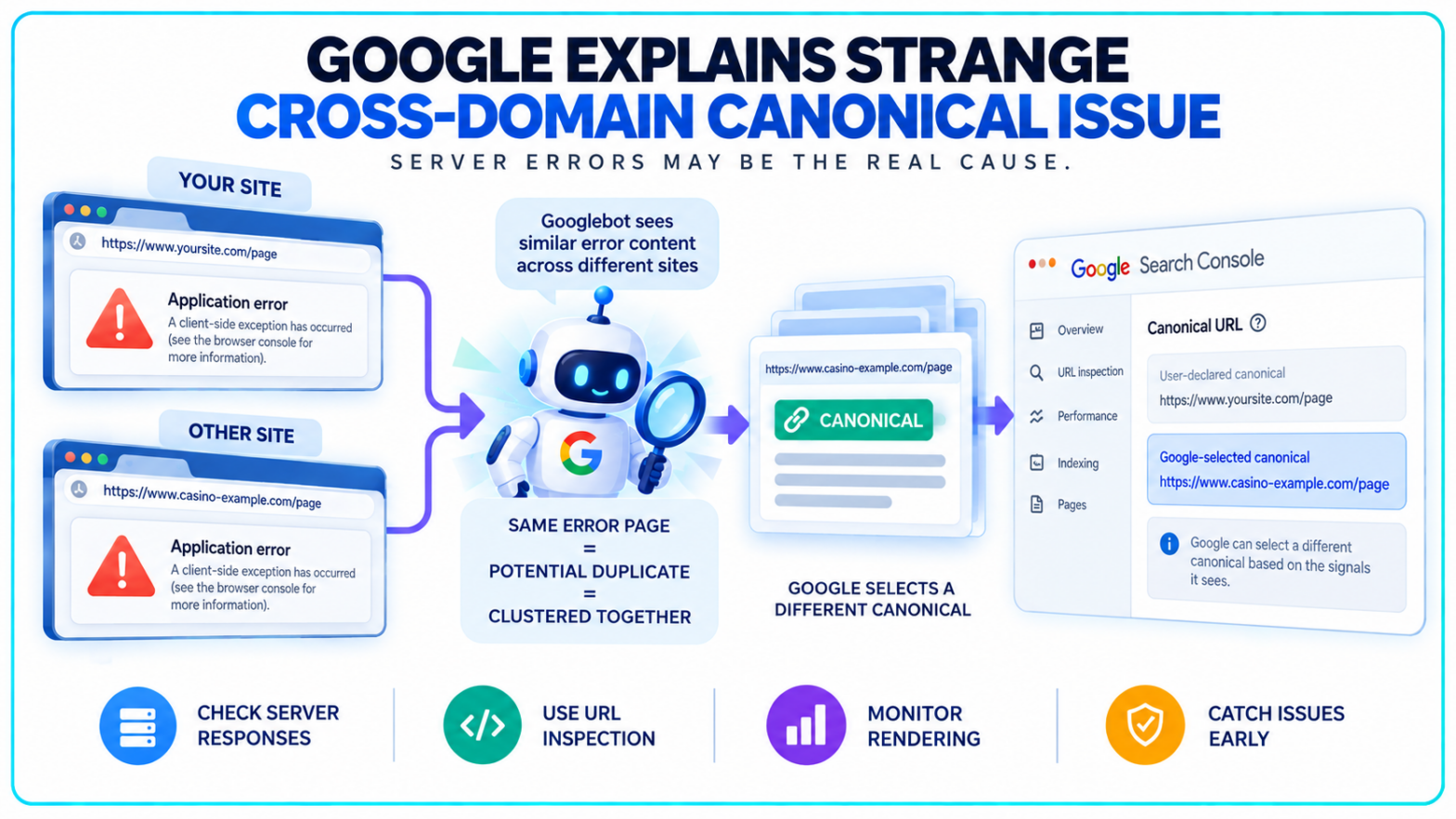
A completely unrelated website showing up as the canonical version of your page looks like a canonicalization disaster.
The canonical tag may not be the real problem.
Google’s John Mueller has responded to a case where pages appeared to disappear from Search while an unrelated casino domain surfaced as Google’s selected canonical. Rather than confirming a new cross-domain canonical bug, Mueller pointed to a more basic possibility: Googlebot may have encountered the same generic server-error content across multiple domains and grouped those URLs together.
That shifts the technical SEO investigation considerably. The canonical Google displays in Search Console may be the visible symptom, while the failure happened earlier when Google crawled the page.
Google May Have Clustered Error Pages Instead of Real Content
The case began when a site owner reported seeing a growing number of pages leave Google’s index. In Search Console, Google appeared to identify an unrelated casino website as the canonical URL even though the two sites had no obvious content relationship.
Another SEO identified a possible connection.
Both websites had apparently displayed the same generic JavaScript failure message at some point: “Application error: a client-side exception has occurred (see the browser console for more information).”
If Googlebot crawled that fallback response instead of the real pages, URLs from otherwise unrelated websites could suddenly look much more alike than they actually were.
Mueller said that explanation “could be an option” and recommended using Search Console’s live URL inspection functionality to check what Google actually receives when it fetches the affected page.
That matters because Google’s canonicalization system does not simply read a canonical tag and stop there. Google first identifies pages it considers duplicates or near-duplicates, groups them into a cluster and then selects what it sees as the most representative URL.
A temporary error page can corrupt that process if the crawler sees the error instead of the page publishers expected it to see.
A Google-Selected Canonical Is Not Proof of a Bad Canonical Tag
The phrase “cross-domain canonical” makes the incident sound as though one website deliberately pointed its canonical element at another domain.
There is no evidence that happened in this case.
Google treats rel="canonical" as a strong signal rather than an absolute directive. Its canonical URL documentation says redirects, canonical annotations and sitemap inclusion can all influence which URL becomes canonical, but Google can still select a different URL based on the signals it sees.
That distinction is essential when diagnosing a strange Google-selected canonical.
If the affected page actually contains a cross-domain canonical pointing somewhere else, the problem may be a CMS error, plugin issue or potentially a compromised site. Google’s own canonicalization troubleshooting guidance specifically lists incorrect canonical elements, server misconfigurations and malicious code among potential causes of unexpected canonical selection.
If no such canonical exists, the investigation needs to move upstream.
What did Googlebot render? Did the server return the proper content? Was there an application failure? Did several URLs temporarily return the same fallback page?
The URL that Search Console labels canonical may only be where that chain of signals ended.
Mueller Says the Search Outcome Is Similar Either Way
Mueller’s response focused less on the strange domain and more on why the affected page was unavailable in normal search results.
He outlined three possible situations: Google could treat the original URL as canonical but index the server-error content, classify the page as a soft 404, or choose the other URL as canonical.
In all three scenarios, the practical result is similar. The intended page does not appear normally in Search.
That makes server monitoring more important than chasing the unexpected canonical alone.
Mueller recommended catching these failures before they persist long enough for search engines to process them, including automated testing and recurring checks of critical pages. His point was straightforward: if Googlebot repeatedly encounters a broken application shell, the indexing consequences can become more stable even after the visible site appears healthy again.
TechWyse has seen the same diagnostic principle surface in other indexing cases. Google previously explained that a “Page indexed without content” error can originate at the server or CDN layer, where Googlebot receives something different from what users or ordinary testing tools see.
Canonicalization does not operate independently of crawling.
Bad input can produce a very strange output.
Syndicated Content Still Needs a Different Canonical Strategy
The incident also brings an older canonicalization problem back into view: publishers distributing the same article across multiple domains.
Google does not currently recommend cross-domain canonical tags as the primary method for controlling syndicated copies.
Its Google News duplication guidance advises syndication partners to use Googlebot-News noindex when publishers want the duplicate excluded from Google News. If the syndicated copy should also stay out of regular Google Search, partners can use a Googlebot noindex directive instead.
Google explicitly says canonical links are not recommended for handling syndicated news articles because syndicated versions can differ substantially from the original.
That position is not new. John Mueller gave the same direction in a previous Google SEO office-hours explanation about syndicated content, saying publishers that do not want syndicated versions appearing in Search should have those versions use noindex.
For publishers, that separates two issues that can otherwise get mixed together.
Legitimate syndication is a duplicate-content management problem. An unrelated domain appearing as Google’s canonical without an intentional relationship is a technical diagnostic problem and may involve rendering failures, server configuration, hacking or another signal entirely.
Canonical Troubleshooting Starts With What Googlebot Actually Saw
For technical SEO teams, the practical response to an unexpected cross-domain canonical is not to change canonical tags immediately.
First, inspect the affected URL in Search Console and compare the user-declared canonical with Google’s selected canonical. Then use the live test to check whether Googlebot can currently retrieve and render the expected content.
Server logs add another layer. They can show when Googlebot visited the page, the status code returned and whether an application or infrastructure problem coincided with the indexing change.
TechWyse recently covered Google’s clarification that canonicalization fixes can take up to two weeks to register. Google’s current troubleshooting documentation says duplicate clusters can persist during re-evaluation even after the underlying content or technical problem has been fixed.
Search Console can also create misleading signals when viewed without live checks. During a recent reporting delay, TechWyse noted that Google Search Console indexing data can lag behind Google’s actual crawling and indexing systems. A report should therefore be treated as diagnostic evidence, not a complete reconstruction of what Googlebot encountered at a specific moment.
Google has not confirmed a broader cross-domain canonical failure affecting publishers.
The reported case instead exposes a less obvious technical SEO risk: if an application temporarily replaces real pages with a generic error response, Google may make indexing decisions based on that response long before anyone notices an unusual canonical inside Search Console.