

CRM work used to split neatly in two. Administrators configured the system on a desktop, while sales teams consumed whatever appeared on their phones.
Zoho is narrowing that divide.
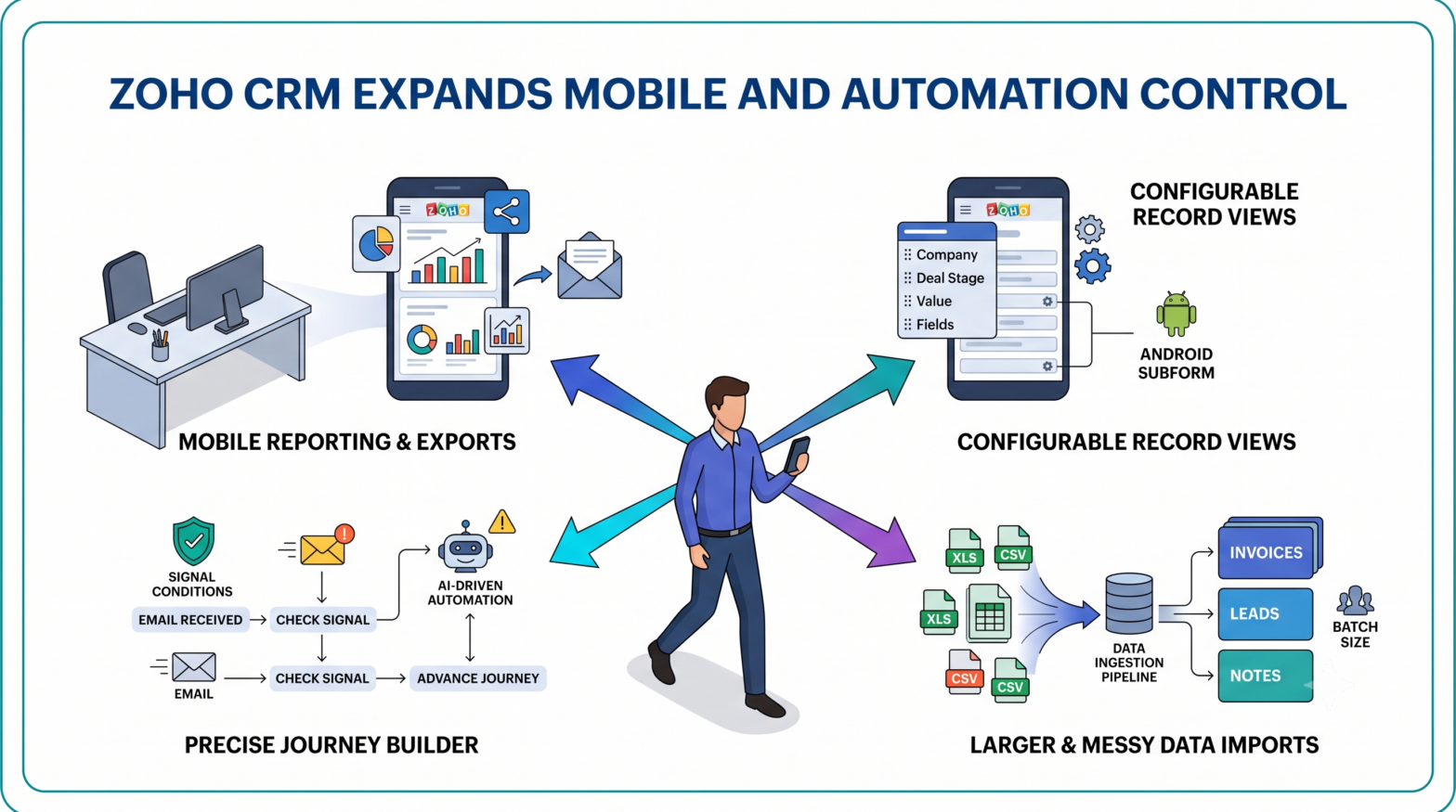
Across six recently released or newly documented capabilities, Zoho CRM is expanding what users can see, export, structure and control from the point of work. The changes cover mobile reports, configurable record cards, Android subforms, complex data imports, email synchronization and the conditions that move customers through automated journeys.
Individually, several of the changes look minor. Together, they shift more CRM decisions away from back-office maintenance and into the workflows where sales, service and marketing teams already operate.
Mobile CRM Is Becoming a Working Surface
A record card is only useful when it shows the information needed to make a decision.
Zoho’s updated display field settings for its CRM iOS app allow users to control which fields appear across list views, search results, related lists and lookup screens. List-view cards can contain up to nine fields, while search, related-list and lookup cards support up to five.
That gives users more context before they open a record.
A salesperson could place a lead’s company, source, phone number and email directly on the list card. Someone searching for an account could display the industry or website to distinguish between similar names. Related deal cards can expose the stage and value while the user remains inside the contact record.
The customization extends beyond field selection. Users can choose the heading, subheading and supporting items, control profile images, switch between compact list and larger card layouts, and configure available record actions. Supported actions include placing calls, changing task statuses, updating deal stages and checking into meetings.
Zoho also separates mobile-only configurations from web-controlled setups. Mobile Only mode stores the arrangement inside the app, while Web Setup follows the custom views established in the desktop version. Mobile-only changes disappear when the user signs out or resets the app, preserving the distinction between personal preferences and organization-wide configuration.
Android users are getting a different kind of control. Zoho’s Android subform support allows users to enter values into static subforms containing rows established in advance by an administrator. A delivery record, for example, could contain fixed rows for handover, signature, photographs and damage checks, with field employees completing the editable values after each stop.
The structure remains centrally defined. The data can now be completed where the activity takes place.
Reports Leave the Desktop, but Report Building Does Not
Zoho is also extending CRM reporting into the iPhone app, though it has kept report creation on the web.
Through the Reports module in Zoho CRM for iOS, users can open reports created in the desktop application, browse report folders and tap individual rows to inspect the underlying record. Reports can also appear as charts when a chart has already been configured in the web version.
Exporting is available in two forms.
Formatted reports retain the CRM’s grouping and presentation and can contain up to 5,000 rows. Detailed reports remove the grouping and can export as many as 50,000 rows. Users can select a file format and save or share the resulting file from the mobile device.
Reports can also be emailed to people inside the organization or sent to additional external addresses. The sender can distribute the report immediately or schedule it for later.
That turns the mobile app into a distribution and review layer rather than a full report builder. Managers can check pipeline or revenue data away from their desks, but the underlying report design, fields and chart configuration still come from the desktop environment.
The arrangement preserves administrative consistency while reducing the delay between seeing a number and acting on it.
The Import Tool Is Taking On Messier CRM Data

Mobile access solves only one side of the operational problem. CRM records still need to enter the system cleanly.
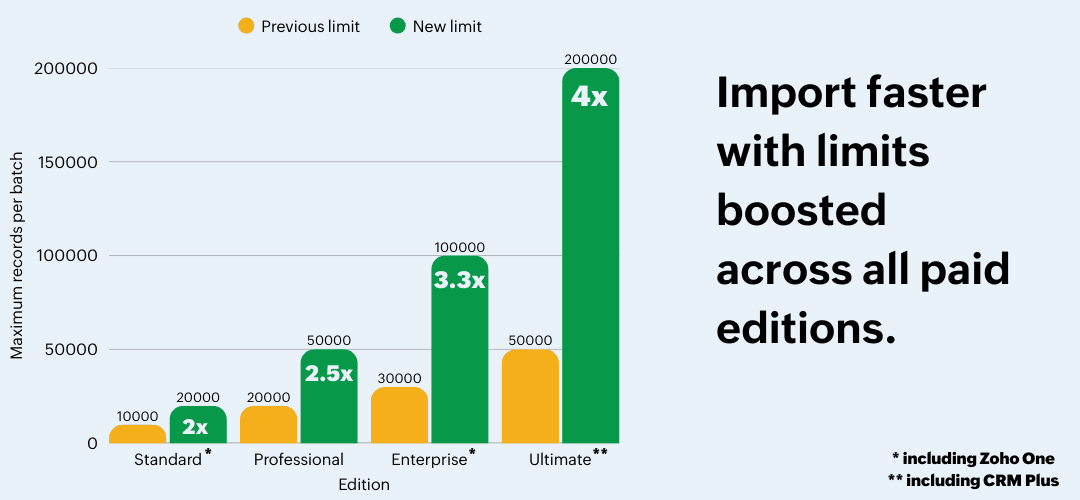
Zoho’s revamped CRM import feature raises the maximum number of records that paid editions can process in a batch. The increase varies by plan, ranging from twice the former limit for Standard editions to four times the previous limit for Ultimate. The free edition remains at 1,000 records per batch.
XLS and XLSX uploads are no longer held to a separate 5,000-record ceiling. Spreadsheet files can now use the same edition-based limits as CSV imports.
The larger change concerns related data.
Quotes, invoices, sales orders and purchase orders can now be imported through their individual module import tools instead of requiring the migration utility or an API. Users can also import dependent information alongside the primary records, including subform rows, multi-select lookup associations and multi-user associations. Several files can be dropped into the tool and mapped to their corresponding modules during the same operation.
An invoice and its line items, for example, no longer need to be treated as separate import projects.
Zoho has also added update and upsert operations for notes, which previously could only be created through the importer. Multi-select picklist values can be appended rather than replacing the values already stored in the field. Other changes include optional email notifications when imports finish, record updates when data storage is full, update and upsert support in the free edition, and ISO-8859-8 character encoding for Hebrew data.
The update reflects a broader shift in CRM data management. Customer records increasingly feed advertising platforms, analytics systems and offline conversion pipelines. Broken associations or overwritten values do not stay contained inside the CRM.
They travel.
Journey Logic Gets More Precise
Automation depends on knowing the difference between a customer attribute and a customer action.
Zoho’s updated Journey Builder guidance draws that line through record filters and signal conditions.
Record filters evaluate the fields and values attached to a record already sitting within a journey stage. A business could use the lead-source field to send partner leads directly to a qualified stage instead of putting them through the standard qualification route.
Signal conditions evaluate the event attempting to move the record.
An incoming email alone may not qualify a prospect for the next stage. A signal condition could require the message to contain a subject such as “Request Demonstration” before Journey Builder recognizes it as the event that advances the record. Signal conditions can also evaluate create, read and update events and route records between modules according to values created later in the journey.
The distinction gives teams more precise control over customer journey automation. A field describes the record. A signal condition determines whether a particular behaviour or system event should set it in motion.
Journey Builder can then execute instant, scheduled or recurring actions when a record reaches a stage. Those actions include field updates, functions, webhooks, tasks, tags, lead or quote conversions, and notifications through email or Zoho Cliq.
Zoho is tightening the input side of email integration as well. The new “Sync emails from” setting lets organizations connecting mailboxes through IMAP or POP choose whether Zoho CRM should synchronize the full mailbox history or begin from a specific date. Previously, all available emails were synchronized into the CRM.
Zoho says the option is available to users on the new email integration setup across all its data centres. The company has not yet imposed a maximum email-storage limit, but said such a limit is being prepared. Restricting the synchronization period gives organizations a way to reduce irrelevant historical mail before that storage policy arrives.
The Administrative Work Has Shifted, Not Disappeared
For marketers and CRM operators, the practical issue is configuration consistency.
Mobile display fields should match the decisions employees are expected to make. Import templates need to preserve relationships between primary and dependent records. Email synchronization dates should account for the history sales teams genuinely need. Record filters and signal conditions require different testing because one evaluates stored data and the other evaluates events.
Better lead management depends on those definitions surviving from capture through qualification, reporting and downstream campaign activation. More CRM automation does not reduce the need for data governance. It raises the cost of unclear fields and loosely defined triggers.
Zoho has not removed the administrator from the process. Reports are still built on the web. Static subform rows are still configured in advance. Journey paths still depend on reliable data and properly scoped events.
What has changed is where the resulting system can be used. More CRM decisions can now happen inside the report, record, inbox or field workflow where the customer interaction is already taking place.