

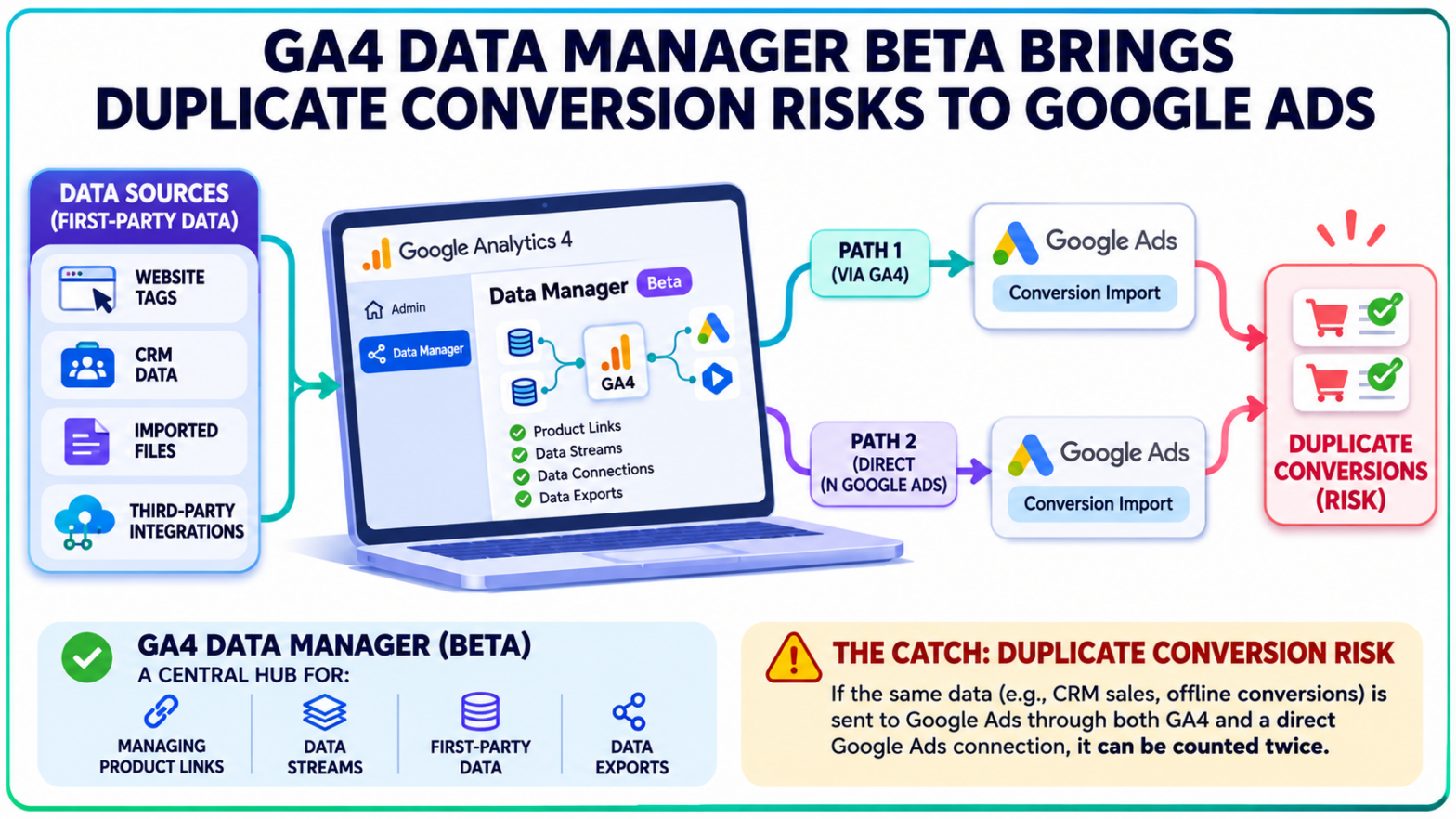
A sale should only be counted once. But with Google Analytics now offering a new way to connect customer data to advertising platforms, businesses could end up recording the same conversion twice without realizing how it happened.
Google launched Data Manager in Google Analytics 4 (GA4) on November 6, 2026, introducing a central hub for managing product links, data streams, and first-party data connections.
The beta gives administrators a clearer picture of where their data originates and which Google products receive it. There's a catch, though. Google explicitly warns against running identical data pipelines through both GA4 and Google Ads because doing so can create duplicate conversions.
For advertisers importing offline sales, CRM records, and other first-party data, understanding which platform manages each connection is now especially important.
GA4 Data Manager Brings Data Connections Into One View
Managing data connections in Google Analytics has traditionally meant moving between several administrative settings. Product links, web and app data streams, and imported datasets could be configured separately, leaving administrators to piece together how information travelled between systems.
The new Data Manager in Google Analytics brings those connections together.
Available through the Admin section, the beta introduces a visual data connection map showing the relationship between incoming data sources, the GA4 property, and connected destinations.
The map organizes connections into four main areas:
- Data sources: Where information originates, including website tags, CRM systems, imported files, and third-party integrations.
- Data types: The types of imported data associated with supported connections.
- Properties and streams: The Google Analytics property and its associated website or application data streams.
- Data exports: Connected Google products receiving information from Analytics.
Administrators can switch between compact, expanded, and full-page map views to examine their configuration at different levels of detail.
Individual connections can also be inspected to reveal their status. Broken connections and other detected problems appear with visual indicators, while supported diagnostic alerts provide troubleshooting information and corrective actions.
Google has also integrated guidance for identifying potential gaps in data collection.
The new interface builds on earlier changes to Google Ads conversion tracking, including the expansion of Tag Manager controls within Google Ads.
The difference is that Data Manager now gives Analytics administrators their own central view of these connections.
Google Ads Receives the Data, But the Flow Is Not Reversed
One of the most consequential details in the beta concerns the direction in which imported information travels.
According to Google's Data Manager documentation, data ingested through Data Manager in GA4 can flow downstream to linked Google Ads and Google Marketing Platform accounts.
The reverse does not happen through that same pathway.
An advertiser who imports customer information through Google Ads Data Manager should not assume the data will automatically become available within GA4.
Likewise, creating a new connection in Analytics does not replace an existing import configured separately inside Google Ads.
The distinction matters because Google Ads Data Manager already supports connections to external sources for purposes such as offline conversion imports and Customer Match.
The new GA4 interface adds another entry point for managing first-party data rather than replacing every existing integration.
Google's recommended approach separates new and existing connections. New Data Manager connections should be configured through Analytics, while connections already established through Google Ads or Google Marketing Platform should continue to be managed through their existing interfaces.
Some data types, including item data and third-party campaign data, must also be configured directly within GA4 Data Manager.
Advertisers therefore need to distinguish between the source of their information, the platform managing the connection, and the destination receiving the data.
Duplicate Conversions Become a Risk When Pipelines Overlap
The central concern is not that GA4 Data Manager automatically duplicates transactions.
It's what can happen when the same information reaches an advertising account through two independently configured pipelines.
Consider a business that records completed purchases or qualified sales in its CRM.
It already sends those transactions directly to Google Ads through an established offline conversion import.
An administrator then creates another connection in GA4 Data Manager using the same CRM data. That information flows onward to the linked Google Ads account.
Now the same underlying sale has two potential routes into the advertising platform.
Google warns that activating identical pipelines through both interfaces can cause conversions to be logged twice.
The consequences depend on how those conversion actions are configured and used in campaign reporting.
A duplicated purchase or sale could inflate recorded conversion totals or conversion value. If both records contribute to a campaign's bidding goals, automated bidding may also receive an inaccurate picture of performance.
Google has addressed related duplication problems in its separate multi-source conversions documentation, which explains that deduplication within a conversion action does not automatically extend across separate conversion actions.
That distinction also appeared in earlier reporting on duplicate conversions and offline uploads.
The exact configurations differ, but the measurement concern is similar: collecting the same transaction through multiple routes does not guarantee that Google Ads will treat those records as a single conversion.
An additional data connection is not necessarily an additional sale.
Existing Data Imports Will Appear Without Being Recreated
There is an important safeguard for advertisers already using GA4 data imports.
Google says existing Analytics imports will automatically appear in Data Manager. Administrators do not need to recreate those connections simply to make them visible in the new interface.
For new integrations, Google recommends using GA4 Data Manager as the starting point.
The distinction is particularly relevant for accounts with established CRM integrations, scheduled file imports, or complex advertising measurement systems.
Recreating an existing pipeline because it appears in a new administrative interface could introduce unnecessary duplication.
Data Manager's connection map provides a way to inspect the current setup before making changes. Users can examine incoming sources, connected products, and the destinations receiving Analytics data.
The interface also includes controls for adding and deleting connections.
Connection health and conversion accuracy remain separate concerns, however. A functioning data pipeline does not by itself establish whether the same business transaction is being counted elsewhere.
Google has already introduced other tools for examining imported information, including its campaign data import validation report, which identifies gaps in non-Google campaign performance data.
The Data Manager beta focuses more broadly on connection visibility, setup, and diagnostics.
Its availability also has limits. Google says the new Data Manager landing page does not currently support GA4 subproperties or roll-up properties, and users require appropriate property permissions.
Conversion Tracking Audits Take on New Importance for Paid Media
The practical implications are clearest for businesses that combine website activity with offline customer data.
E-commerce advertisers may collect purchase events through website tracking while maintaining transaction records in their order management systems. Lead-generation businesses may record form submissions online but rely on CRM data to identify which enquiries eventually become sales.
Both arrangements can involve multiple measurement systems feeding information into Google Ads.
For paid media teams, reviewing a GA4 Data Manager setup now involves checking whether an imported dataset is already connected through another Google product, identifying which conversion actions receive the records, and confirming how those actions contribute to campaign goals.
The same scrutiny applies when interpreting conversion totals, conversion value, and return on ad spend. A rise in reported conversions following a connection change is not necessarily evidence of increased sales.
The beta also arrives as Google continues expanding cross-channel conversion reporting between Analytics and Google Ads, including support for app conversion data and more detailed attribution controls.
Data Manager addresses a different part of that measurement process: the connections that bring information into Analytics and make it available to linked products.
Google's November 6 release notes confirm that the feature remains in beta.
For existing Google Ads and Google Marketing Platform integrations, the published guidance is to continue managing established connections in their current interfaces rather than creating identical pipelines in GA4.