

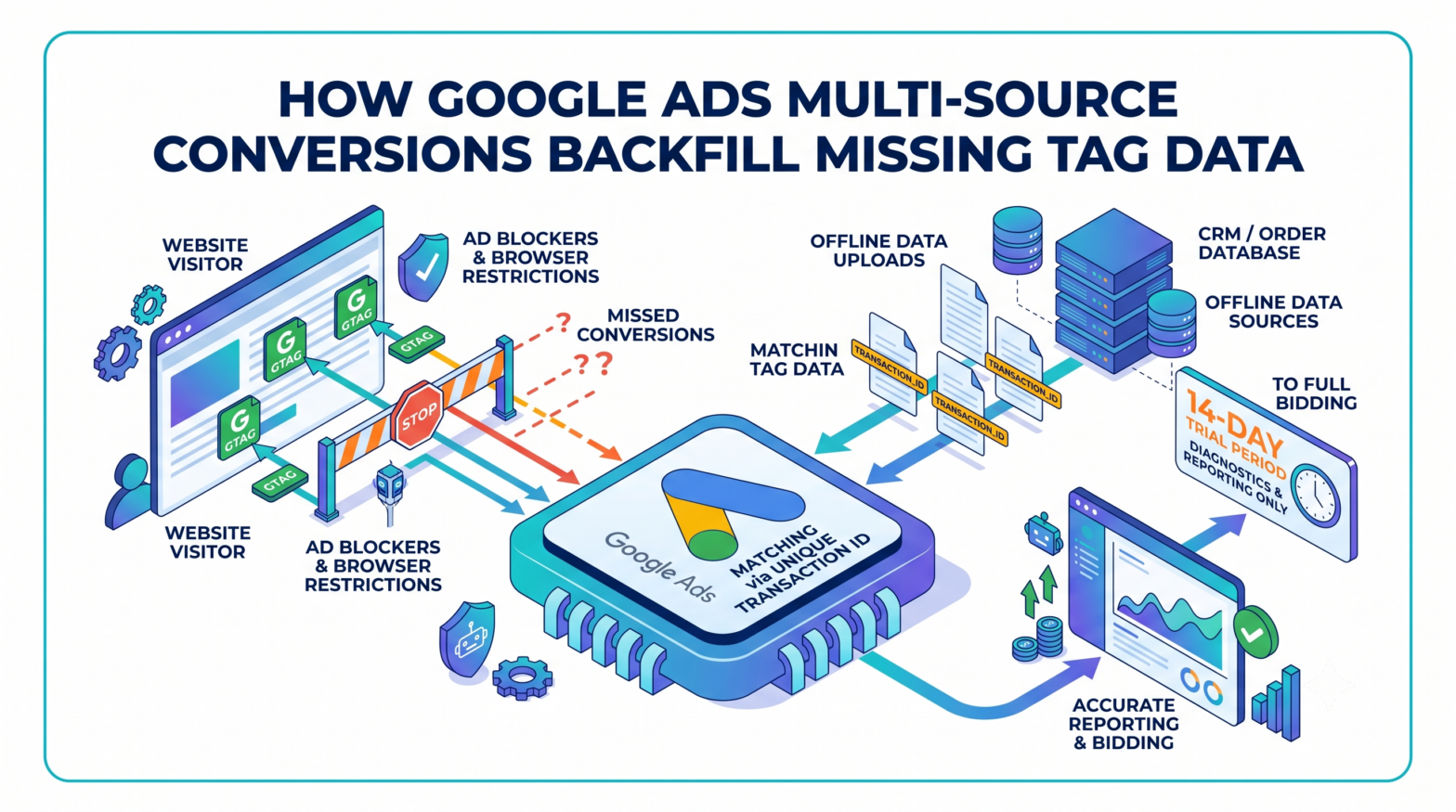
Google Ads advertisers can now use offline data uploads to fill in conversion data their website tags failed to capture due to ad blockers, browser restrictions, and cookie loss. Google documented the capability in a new Help Center page titled "Multi-source conversions in Google Ads (beta)," published through its Google Ads Help Center and confirmed in a supporting FAQ document dated July 7, 2026.
How the Feature Connects Offline and Tag-Based Data
Within a single conversion action, Google uses the `transaction_id` to match events from an additional data source with those captured by the website tag, allowing advertisers to recover conversions that the tag did not capture. Advertisers connect backend systems, such as a CRM or order database, through Google Ads Data Manager or the Data Manager API, which then supplements the online signals captured by the Google tag.
The feature is currently limited to Google Ads website conversion actions set up manually using code via the Google tag or Google Tag Manager, because the system relies on a unique Transaction ID to accurately match and deduplicate events between the two data sources. Imported Google Analytics conversions and URL-based conversion actions are not supported.
What Offline Data Can and Cannot Change
When a transaction ID in the offline upload matches an existing tag event, the behaviour depends on which field is being updated. Advertisers can send accurate financial updates, including restatements, upsells, or finalized cart totals, from their CRM to override the value the tag recorded, and can also supplement the tag with missing user-provided data such as email or phone number.
Not all fields are eligible for overwriting. Google uses the `transaction_id` to match events and can update conversion values or recover missing conversions, but deduplication and value updates apply only within the specific conversion action to which the additional data source is linked, not across other conversion actions in the same account. Fields such as GCLID from a matched upload are ignored; the tag's original attribution identifiers are preserved.
Google's documentation strongly recommends uploading data within 24 hours of the conversion event to ensure eligibility for Enhanced Conversions matching and optimal Smart Bidding optimization. For value adjustments specifically, updates will only be processed for conversions that occurred up to 55 days in the past.
Advertisers must also be careful with value formatting. Uploaded conversion values must use the exact same format and currency units as the Google tag; uploading values in a different unit, such as integer cents instead of dollars, will cause severe conversion value inflation because the system does not automatically convert units.
The 14-Day Trial Period Before Bidding Activates
When an additional data source is connected to a biddable conversion action, it enters an initial 14-day trial period during which data from the additional source is used for reporting and diagnostics but does not impact bidding, giving advertisers time to resolve setup issues before the conversions automatically become biddable after 14 days.
Throughout the trial period, advertisers receive multi-source conversion diagnostic alerts to help identify and resolve setup or data quality issues without the additional data uploads affecting bidding. Conversion value updates are also disabled during this window; the tag's original value remains in reporting until the trial concludes.
Eligibility and Setup Limitations
The Google Ads Data Manager UI currently allows advertisers to connect only one additional offline data source to a single website conversion action. Access via the Data Manager API requires placement on an allow list.
Advertisers setting up a new conversion action specifically for this feature face a double-counting risk. Google's Help Center documentation warns that the platform removes duplicate data only within a single conversion action, between the tag and the additional data source, and not across two separate conversion actions. Running both in the same campaign goal set would result in a single transaction being counted twice.
Implications for Advertisers Managing Tag-Based Measurement
For advertisers dealing with measurement gaps caused by ad blockers, Intelligent Tracking Prevention (ITP), or lost cookies, multi-source conversions offer a structured method to introduce backend data into a single conversion action without creating a parallel tracking setup. In practice, this means CRM exports or order management system data can serve as a verification and gap-filling layer alongside the existing tag, rather than replacing it, provided transaction IDs are consistently generated and passed through both systems. The 14-day trial window creates a testable checkpoint before offline data influences Smart Bidding, which gives advertisers an opportunity to validate data quality before it affects bid optimization.
Google reportedly renamed the feature last month, from "conversions with multiple data sources" to "multi-source conversions," and has since published a dedicated Help Center page, an FAQ document, and supporting documentation covering diagnostics, tag troubleshooting, and supported data sources. The feature remains in beta, and Google's documentation notes that access may not yet be available to all advertisers.