

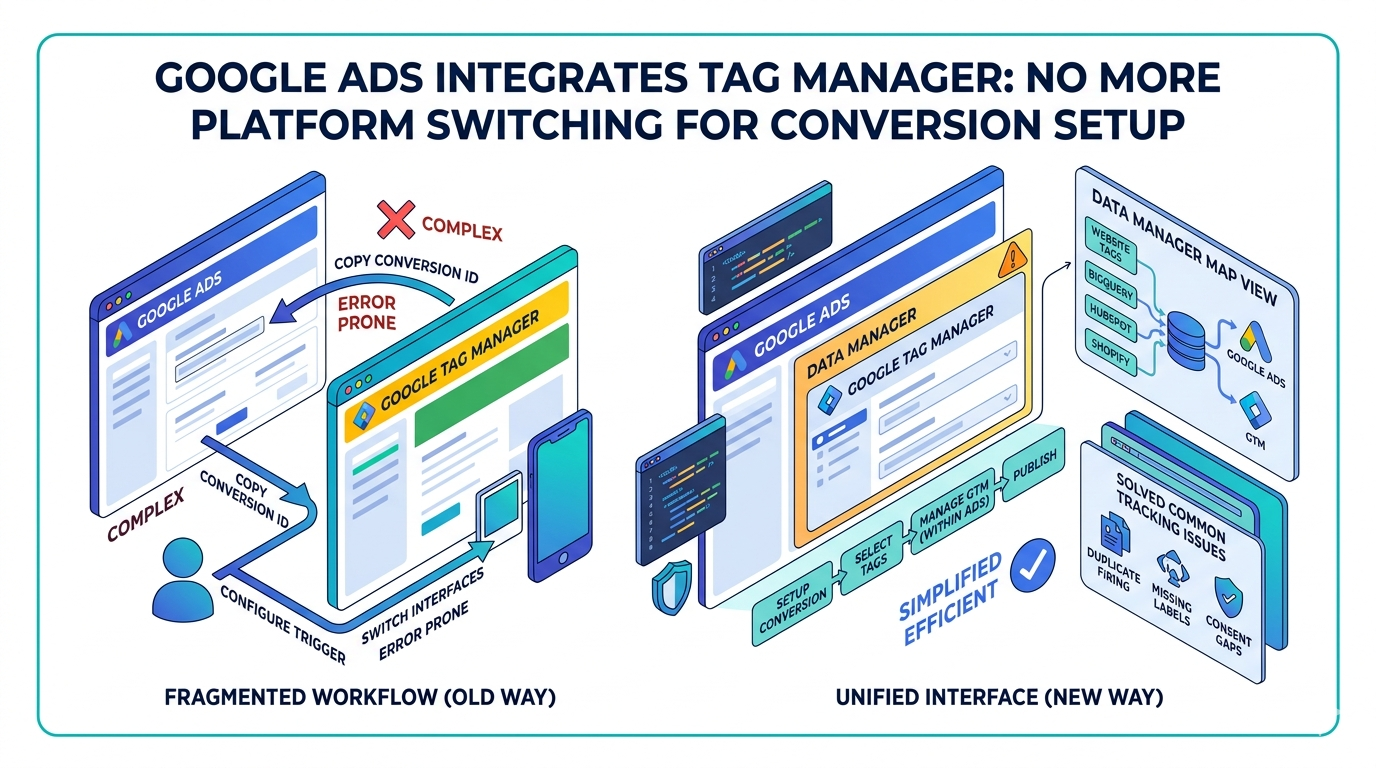
Google Ads advertisers can now access Google Tag Manager controls directly inside the Google Ads interface, removing the need to switch between platforms to configure conversion tracking. The change, first spotted by data and analytics specialists Marthijn Hoiting and Adriaan Dekker and shared publicly via LinkedIn in early May 2026, surfaces a new "Manage" option inside the Data Manager section of Google Ads that opens Tag Manager controls without leaving the platform.
What Changed Inside the Interface
Advertisers are spotting a new "Manage" option inside the Data Manager section of Google Ads that opens Tag Manager controls without leaving the platform. Based on early screenshots, the flow prompts users to select a GTM container and then surfaces a suggested tag configuration ready to publish. Inside the Data Manager interface, users can see connected data sources, including Tag Manager, and trigger management actions directly from within Google Ads.
This is the second GTM-related interface change spotted in recent weeks. Google Ads is also testing a separate "Set up in Google Tag Manager" option within its conversion setup flow, according to screenshots shared by Google Ads specialist Natasha Kaurra, a feature that appears alongside existing installation methods and allows advertisers to push conversion tracking setups directly into Google Tag Manager. Clicking the button opens a pre-filled tag suggestion flow inside Google Tag Manager, reducing manual steps like copying conversion IDs and labels.
Alignment with Google's Formal Measurement Roadmap
The interface changes arrive alongside a formal platform announcement. In a May 6, 2026, blog post ahead of Google Marketing Live 2026, Gaurav Bhaya, VP and GM of Buying, Analytics and Measurement at Google, outlined a series of measurement simplification updates. Google is upgrading the Google Tag with a new visual setup flow that lets advertisers upgrade existing tags with a few clicks and no coding required, an update Google says brings Google Tag Manager to everyone, centralizing settings and user access while improving data collection and overall site performance.
In the coming months, Google will also roll out a new map view in Data Manager, giving advertisers an intuitive summary of how their data flows from platforms including BigQuery, Google Drive, HubSpot, and Shopify, providing a snapshot of what powers campaigns across Google Ads, Google Analytics, and Google Marketing Platform.
Starting in April 2026, Google Ads began simultaneously accepting user-provided data from website tags, Data Manager, and API connections, removing the previous requirement to choose between different implementation methods. Existing users are being automatically migrated to the new unified setting.
Why Conversion Tracking Has Been a Persistent Problem
Conversion tracking has historically been one of the most error-prone steps in Google Ads campaign setup. Google is bringing a Google Tag Manager setup flow directly into Google Ads, allowing advertisers to start conversion tracking setup inside the Ads platform and push parts of that configuration into GTM with fewer manual handoffs, a change that matters because conversion tracking is one of the most common places where paid media performance gets distorted. A campaign can look weak when the real problem is incomplete tagging, and a bidding strategy can look unstable when the actual issue is duplicate firing, missing labels, consent gaps, broken thank-you page triggers, or inconsistent form events.
Over the last several cycles, Google has steadily reduced the amount of fragmented setup work advertisers need to do across Google Ads, Google Tag Manager, Google Tag Settings, enhanced conversions, and data collection controls, increasingly turning setup into a guided workflow rather than requiring users to jump between several interfaces and manually copy technical values.
Practical Implications for Advertisers and Agencies
For marketing teams managing Google Ads accounts, access to Tag Manager controls within Data Manager could reduce the number of platforms required to complete a standard conversion tracking implementation. Teams that previously needed a developer or a separate GTM login to configure or troubleshoot tags may be able to complete more of that work from within Google Ads itself. The simplification benefits apply broadly; small and midsize businesses in particular often struggle with implementation friction and unclear ownership, making centralized connection management especially useful for them. That said, reducing setup friction does not eliminate the need for governance: organizations should still validate tag configurations, check for duplicate firing, and confirm that any auto-populated setups align with their existing measurement architecture before publishing.
Scope and Rollout Status
Based on the latest reports and interface sightings, Google is bringing a Google Tag Manager setup flow directly into Google Ads. Neither the Data Manager "Manage" option nor the conversion setup GTM button has been confirmed as a full general availability release by Google as of publication. Google has informed the industry that significant changes to Google Tag Manager and Google Tags are expected this summer, with additional details expected at Google Marketing Live. Google Marketing Live 2026 will take place on May 20, 2026, from 8:45 AM PT.