

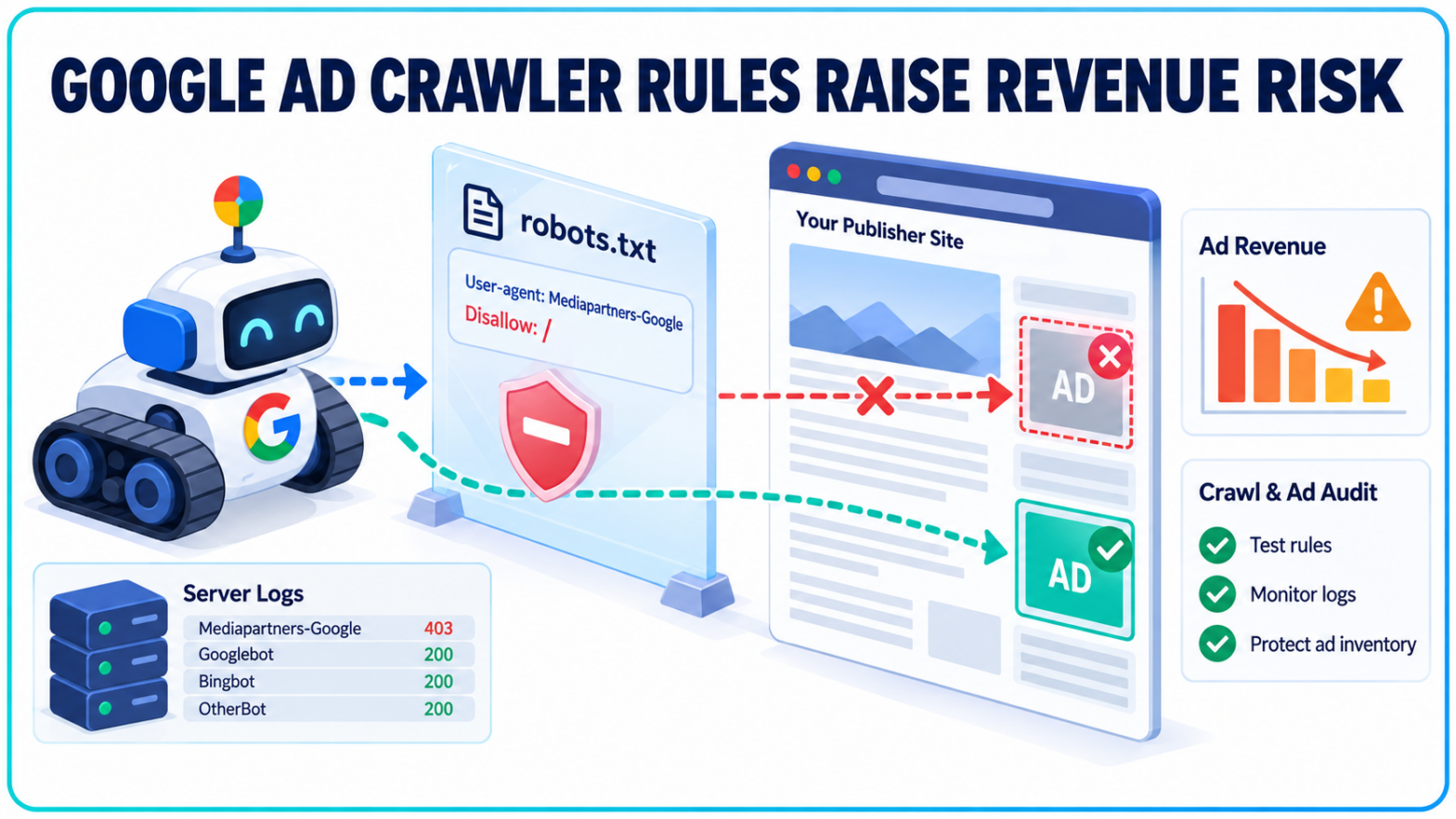
A crawler once treated as an AdSense detail now sits across a wider part of Google’s advertising stack.
Google has revised its developer guidance for MediaPartners-Google, clarifying that directives aimed at the crawler affect multiple ad-related products. For publishers, media companies and other sites carrying large volumes of ad-supported content, an old block in robots.txt may be doing more damage than the team that added it intended.
MediaPartners-Google Is No Longer Framed as an AdSense-Only Crawler
Google’s previous description tied MediaPartners-Google directly to AdSense. The revised special-case crawler documentation, updated September 17, 2026, broadens that scope.
Google now says the crawler visits participating sites to support relevant ad delivery and that its crawl preferences “affect various ad-related Google products.” It names Google AdSense and Google Ad Manager as examples.
The change is small on the page but significant in practice. Google is no longer describing the crawler as a piece of AdSense infrastructure alone. AdSense and Google Ad Manager are examples, not an exhaustive product list.
That wider wording changes the risk calculation around MediaPartners-Google. A directive written years ago to remove an apparently irrelevant AdSense bot may now affect a publisher’s current Google ad setup. The rule can persist through redesigns, platform migrations and changes in monetization partners because robots directives are rarely reviewed as part of an ad operations handoff.
The Wildcard Rule Does Not Control This Bot
MediaPartners-Google is listed as a special-case crawler rather than a common Google crawler. Its robots behaviour has an important wrinkle: it ignores rules written only for the global User-agent: * group.
Sites that want to control it must use the specific Mediapartners-Google token. Google provides this example:
User-agent: Mediapartners-Google
Allow: /archive/1Q84
Disallow: /archive/
That specificity can work in either direction. A general block does not necessarily stop the crawler, while an explicit MediaPartners-Google block can deny access even when every other crawler is allowed. The configuration cannot be judged by scanning the wildcard group alone.
This resembles a separate robots.txt problem Google clarified earlier in 2026: crawler-specific groups can produce a different result from the one suggested by the global rules. A file may look permissive during a quick review while the relevant bot is following a narrower set of instructions elsewhere in the document.
A Block Can Reach Google Ad Manager Inventory
The revenue connection is not theoretical. Google’s Ad Manager crawler guidance says MediaPartners-Google examines page content so the platform can provide relevant ads. It also says the crawler does not access pages or directories prohibited by an applicable robots.txt rule.
Google is more direct in its crawler error documentation. If a site explicitly disallows the Ad Manager crawler, Google says it cannot serve Google ads on those pages. Its recommended correction is to remove this block:
User-agent: Mediapartners-Google
Disallow: /
For a publisher, that creates a different class of technical risk from a typical search crawl problem. The affected page may remain live, rank normally and continue receiving traffic while its advertising layer underperforms or fails. Search dashboards alone will not surface the cause because Google treats its ad crawler and its search crawler as separate systems.
Google also notes that the crawler visits URLs where ad tags are implemented and may follow redirects before evaluating the destination. Fresh articles, user-generated pages and large inventories can briefly experience low ad volume before the content is crawled. Blocked access can turn a short delay into an ongoing serving issue.
The broader Google Ad Manager reference in the revised documentation puts those symptoms in a clearer context. A legacy robots rule belongs in the same diagnostic path as failed redirects, server errors, network restrictions and malformed page URLs.
Server Logs Can Show What the Robots File Cannot
A robots.txt review shows declared policy. Server logs show what happened.
That distinction matters on sites with edge firewalls, bot-management platforms, content delivery networks and regional restrictions. MediaPartners-Google may be allowed in robots.txt but rejected elsewhere with a 403 response, sent through a broken redirect chain or served a login page. Google’s documentation also warns that user-agent strings can be spoofed, so a crawler name in a log entry is not proof that the request came from Google.
Google publishes special-crawler IP ranges and describes forward and reverse DNS checks for validating requests. Its special-case crawlers commonly resolve to a google.com host using the rate-limited-proxy pattern. Comparing verified requests with status codes, paths and response timing can separate a genuine Google crawl failure from ordinary bot traffic.
A programmatic advertising review therefore needs more than one file. Teams should compare explicit robots groups with CDN policies, web application firewall rules, authentication requirements, redirects and actual server responses. The pages carrying ad tags are the useful test set, especially high-traffic templates and recently published content.
Ad Ops and SEO Now Share the Same Configuration Risk
In practice, publishers should identify every explicit MediaPartners-Google directive, confirm why it exists and test whether Google can reach representative monetized URLs. Removing a rule without checking its original purpose can expose sections that were intentionally restricted, so the review should involve ad operations, technical SEO and development rather than a single team working from assumptions.
For publishing, media and heavy-content clients, TechWyse can scope that work as an Ad Ops Crawl Audit. The Technical SEO team would compare robots directives with verified server-log requests and access controls, then test ad-tagged URL templates for blocked or failed crawler responses. The objective is narrow: determine whether technical restrictions are cutting Google off from monetized inventory before the issue is mistaken for weaker demand or lower ad yield.
The updated wording does not say that every Google advertising product uses MediaPartners-Google. It does establish that the crawler’s reach extends beyond AdSense and includes Google Ad Manager. Any wider product effects should be verified against account-level behaviour and Google’s product documentation, not inferred from the examples.
That leaves publishers with a concrete audit trail: the current robots directives, verified crawler requests, returned status codes and ad-serving behaviour on the affected URLs. A rule left behind by a retired monetization setup may still be active long after the business reason for it disappeared.