

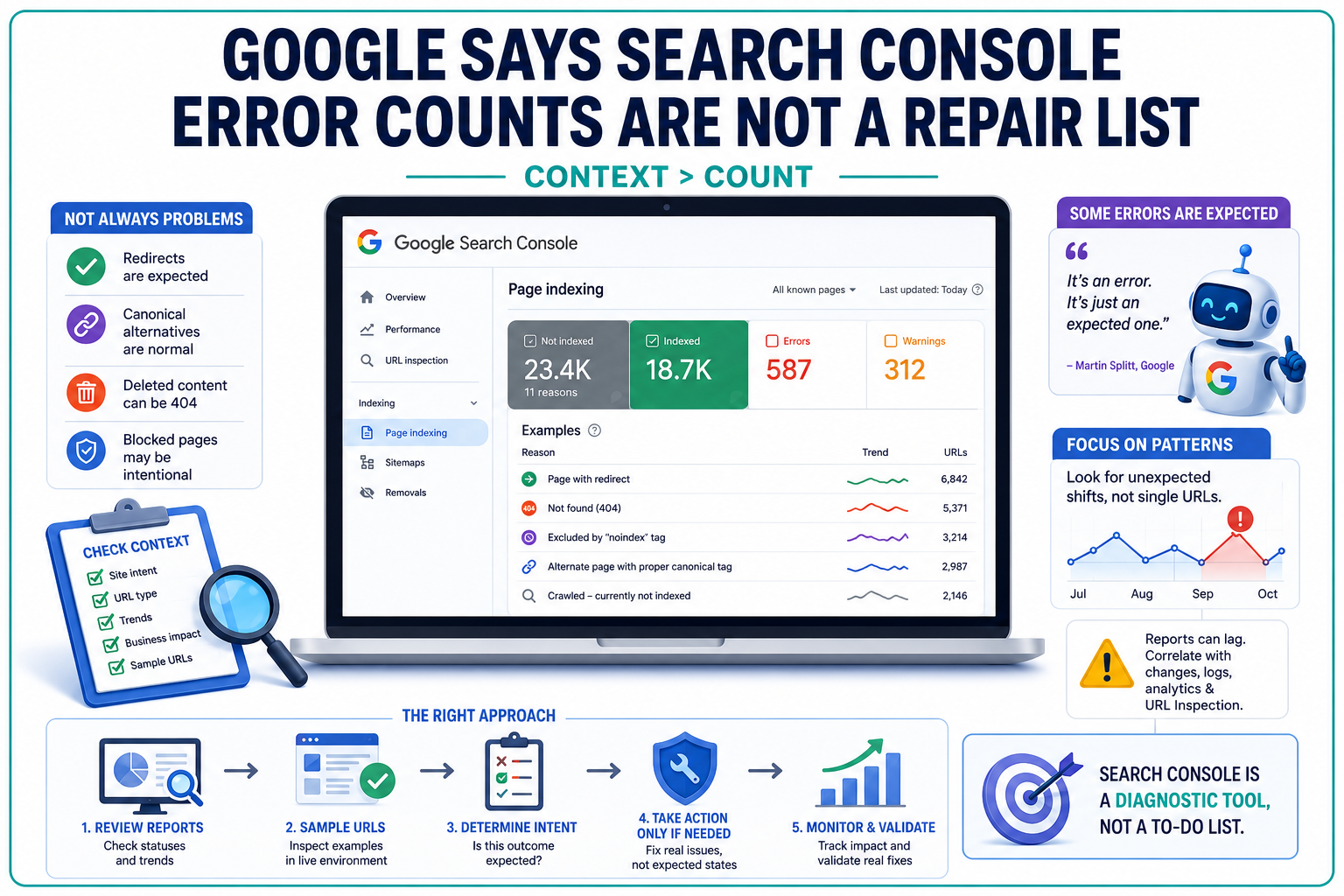
Google Search Console can show hundreds or thousands of excluded pages without proving that a website is broken.
That distinction sounds obvious. The interface does not always make it feel that way.
Google Search advocates John Mueller and Martin Splitt have clarified that many statuses presented inside the Page Indexing report describe expected search behaviour rather than technical faults. The number beside an “error” or “not indexed” category should not automatically become a list of URLs for an SEO team to fix.
The more useful question is whether the URLs are behaving as the site owner intended.
A Large Non-Indexed Count Can Be Completely Normal
Search Console’s Page Indexing report separates URLs into indexed and non-indexed groups, then assigns reasons that explain why certain pages were excluded. Google’s documentation describes the report as a site-level view of index coverage, not a guarantee that every discovered URL belongs in the index.
That difference becomes important on websites with redirects, duplicate pages, deleted content, URL parameters, canonical alternatives or pages intentionally blocked from search.
A product URL that redirects after an ecommerce migration should not remain indexed. Neither should an obsolete campaign page that correctly returns a 404 response. Alternate URLs that point to a canonical version may also appear in the non-indexed section even though Google is processing them exactly as configured.
Mueller said newer Search Console users often see hundreds of non-indexed pages and assume they have discovered a site-wide error. They may then begin changing URLs, internal links, robots directives or canonical tags without first checking whether the reported state is intentional.
That reaction can create a problem where none existed.
The Page Indexing report should instead be read in context. A rising redirect count during a planned migration may confirm that Google has started processing the new URL mapping. A sudden increase in blocked pages after an unplanned deployment may indicate a genuine technical SEO failure.
Same chart. Very different diagnosis.
Search Console’s Language Encourages the Wrong Response
Part of the confusion comes from the interface itself.
Search Console uses labels such as “error,” sends issue notifications and offers buttons such as “Validate Fix.” Those design choices can imply that every listed condition requires corrective action, even when the condition is expected.
Splitt acknowledged that this presentation can push users toward the wrong conclusion.
“And I think the mechanism we have for people to acknowledge that they understand what’s happening is this like fix, confirm fixed or mark as fixed or something. And… while generally a great thing, I think in this case, it’s a little… It’s triggering the wrong response or the wrong expectation, I think.”
Google’s validation documentation confirms that the process is built to recrawl known affected URLs after a correction has been made. It does not change whether the underlying category is inherently harmful. Even after every instance has been resolved, an issue may retain its “Error” or “Warning” severity label while the affected count falls to zero.
There are real cases where validation is appropriate. A server configuration could accidentally return 404 responses for active pages. A noindex directive might appear on a valuable landing page. A malformed redirect chain could prevent Google from reaching its intended destination.
But the presence of a validation button is not evidence that validation is required.
Google’s recent clarification also follows several periods in which Search Console reporting itself created misleading signals. TechWyse previously reported that the Google Search Console Page Indexing report had fallen behind fresh data, making resolved issues appear active and newly published pages appear unprocessed.
A reported status must be interpreted alongside timing, site changes and other available data.
A 404 Is Sometimes the Correct Technical Response
Few Search Console labels generate more unnecessary work than “Not found (404).”
A 404 status means a requested resource does not exist at that URL. It is an HTTP error from the perspective of the request, but it does not necessarily represent an error in the website’s implementation.
When content has been permanently removed and there is no suitable replacement, returning a 404 or 410 response is technically appropriate. Google’s longstanding guidance says old content can return either code, while URLs for content that has moved should generally redirect to the new location. Google also advises that 404 reports for URLs that never existed can often be ignored.
Splitt described these cases as expected errors.
“It’s actually a good thing. The problem is that, and then I get the question like, so, but why does Search Console show it as an error?
“Because it is an error. It’s just an expected one.”
The status still deserves investigation.
A 404 may expose an outdated internal link, a broken navigation path, an incorrect sitemap entry or a URL that should have been redirected. The appropriate response is to determine why Google requested the address, not to redirect every missing page automatically.
Blanket 404 redirects can send users and crawlers to unrelated pages, conceal broken architecture and create soft 404 conditions. In many cases, leaving a genuinely removed URL as a 404 is cleaner than forcing it to the homepage.
Technical SEO depends on matching the response to the page’s intended lifecycle.
Patterns Matter More Than Individual Status Labels
Google’s preferred approach is to look for unexpected movement across groups of URLs.
A single excluded URL may reveal little. A sharp change affecting a template, directory or page type can reveal much more.
During a migration, for example, teams should expect old URLs to move into “Page with redirect.” If that category remains flat after redirects are launched, Google may not have recrawled the old addresses yet, or the redirects may not be accessible.
If “Crawled — currently not indexed” rises across newly published pages, the issue may not be a conventional crawl failure. Google has accessed those pages but has not selected them for the index. Google’s own URL Inspection documentation notes that a URL being outside the index is not necessarily an error, particularly for duplicate and alternate pages.
The same pattern-based reading applies to reporting disruptions. TechWyse’s coverage of the earlier Search Console Page Indexing delay showed how stale reporting could create a false impression that indexing fixes had failed.
SEO teams should compare report movements against deployments, migrations, publishing schedules, crawl logs, analytics and individual URL inspections.
That is closer to monitoring a system than clearing an inbox.
Not Every Indexing Decision Has a Technical Fix
Mueller also drew a line between technical exclusions and Google’s indexing decisions.
A server fault can be corrected. So can an accidental robots.txt block or broken canonical tag.
Google deciding not to index a page is different.
Search systems do not automatically retain every crawlable URL. A page may be discovered and rendered correctly but still remain outside the index because Google does not consider it necessary to store that version. The cause may involve duplication, low distinct value, canonical consolidation or other indexing assessments rather than a discrete technical defect.
Google’s crawling and indexing FAQ states that crawling and indexing depend on multiple factors and that Google does not guarantee when, or whether, a particular URL will be indexed.
Repeatedly requesting indexing does not convert that judgement into a technical repair. Nor does changing minor page elements solely to clear a Search Console category.
There are statuses that should receive urgent attention. “Page indexed without content,” for example, can indicate that Googlebot is being blocked at the server or CDN layer even though users can load the page. TechWyse previously covered how that specific Search Console indexing error can put pages at risk of removal from the index.
The category and context determine the severity. The colour of the label does not.
For marketers and SEOs, the practical change is procedural. Search Console issues should be triaged by intent, affected page type, trend direction and business importance before development work is assigned. Reports can identify where to investigate, but they should not be converted directly into technical tickets without verifying example URLs and checking the live state.
Search Console remains one of the clearest views into how Google processes a website.
It is a diagnostic system, though. Not a to-do list.