Google has widened Demand Gen’s feed engine, but not in the way retail advertisers may expect.
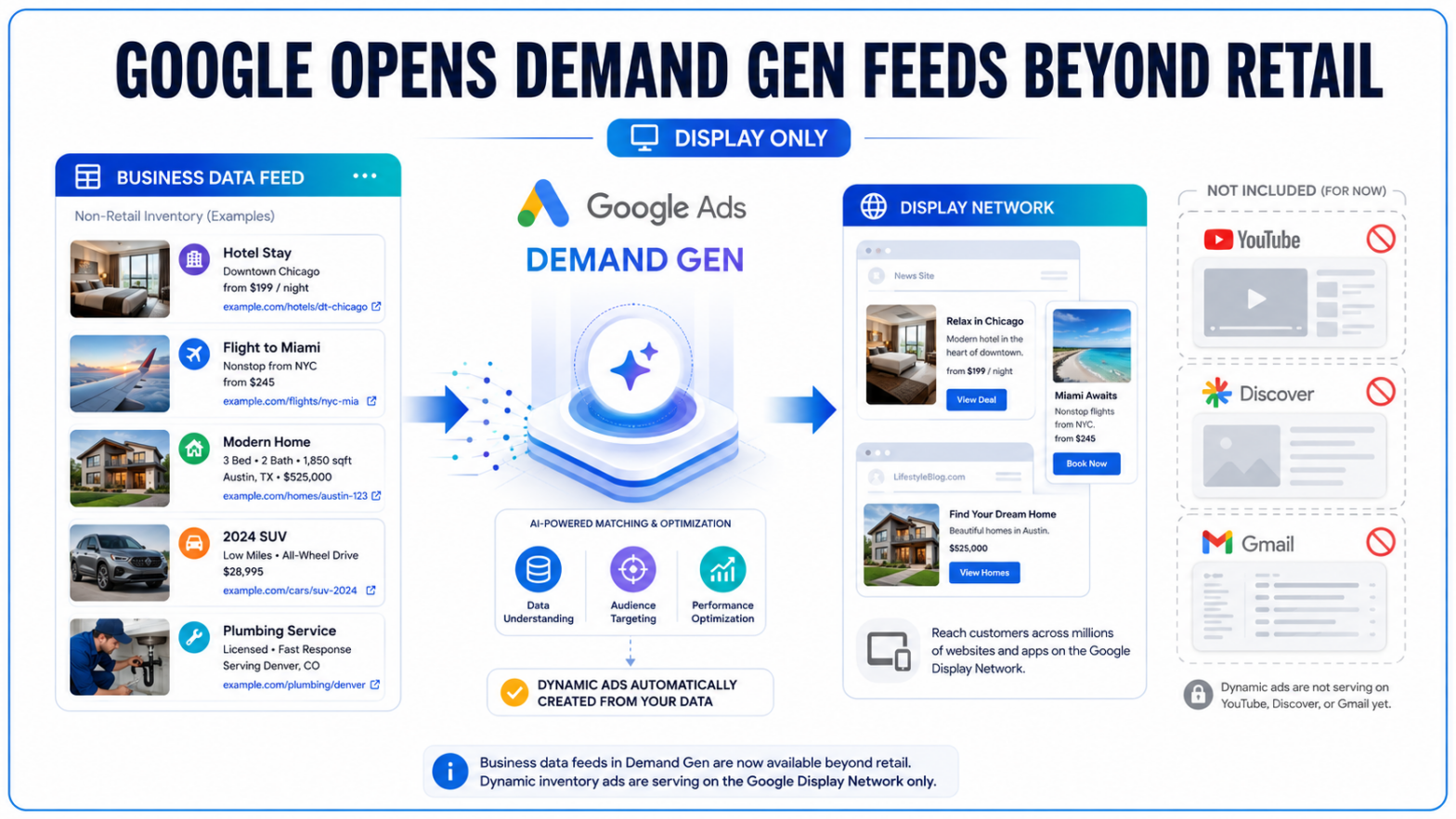
The new business data feed option is built mainly for inventory-driven companies outside the traditional retail ecosystem. Its dynamic ads are also confined, at least initially, to the Google Display Network. YouTube Shorts, Discover, Gmail and other prominent Demand Gen placements are not included.
That restriction makes the release more focused than the broader Demand Gen branding suggests.
Demand Gen’s New Feed Option Is Not a Retail Product Feed
Google’s new help documentation allows advertisers to connect a business data feed to a Demand Gen campaign and automatically match listed inventory with a user’s interests or online activity.
The intended users are businesses whose inventory does not fit neatly inside a standard online store.
Google specifically identifies travel, flights, hotels, real estate, automotive companies and local service providers as potential users. A property company, for example, could upload listings containing an image, location, price and destination URL. Google could then use that structured information to create responsive ads featuring individual properties.
That is a different workflow from the Merchant Center product feeds already available in Demand Gen campaigns.
Retailers use Merchant Center to store conventional product attributes such as titles, prices, availability, brands and product images. Business data feeds extend similar catalogue-driven advertising to companies selling bookings, vehicles, homes or other inventory that may not qualify as a typical retail product.
Google says advertisers can continue using Target CPA and Maximize Conversions with the new feed format. Inventory selection changes dynamically, while the campaign’s core bidding system remains intact.
Dynamic Inventory Stops at the Display Network
Demand Gen normally reaches users across YouTube, including Shorts, Discover, Gmail, Maps and the Google Display Network.
Business data feed assets do not inherit that full reach.
Google states that the feeds are currently available only for Display inventory inside Demand Gen. Ads generated from the uploaded listings will not appear on YouTube or Discover during the initial phase.
That distinction matters because the campaign name may create different expectations. Demand Gen has increasingly been positioned as Google’s visual advertising hub, bringing video, feed-based discovery and Display placements into one campaign environment. Google is also moving eligible legacy Display campaigns into Demand Gen as part of a transition expected to continue through 2027.
The new feed integration fits that consolidation, but it starts on the oldest and broadest part of the network rather than its most visible consumer feeds.
Retail product feeds remain a separate system. Merchant Center feeds can turn Demand Gen ads into browsable storefronts across YouTube, Discover and Gmail, with Google recommending at least four eligible products to maximize placement availability. The business data feed release does not replace or expand that retail workflow.
For e-commerce advertisers, the distinction is blunt: this is not a newly unlocked route for pushing ordinary retail inventory into Shorts or Discover. Those capabilities already depend on Merchant Center.
Merchant Center Is No Longer the Only Route to Dynamic Inventory
Until now, much of Google’s catalogue-based campaign automation revolved around Merchant Center.
That worked for physical products with standardized attributes. It was less practical for businesses dealing with hotel rooms, flights, used vehicles, housing inventory or service packages that change frequently.
Business data feeds create another route.
Advertisers first build the feed at the account level under the Business data section of Google Ads. They can select an industry template and add fields such as item IDs, image URLs and landing-page URLs. Google supports direct CSV uploads and secure SFTP transfers, giving companies with larger or frequently changing catalogues a way to update inventory without manually rebuilding each ad.
After the feed passes policy review, it can be attached during Demand Gen campaign creation. The campaign must have Display inventory enabled before the dynamic ads can serve.
Google says the feed itself will not appear in a campaign preview during construction. Advertisers can view and manage it after the campaign has been completed.
That setup reduces repetitive creative work, but it shifts more responsibility onto the underlying data. An outdated price, broken image URL or incorrect landing page can be reproduced across multiple ads instead of remaining isolated in one manually created asset.
Automation increases the value of clean inventory. It also increases the reach of a mistake.
The Feed Choice Becomes Part of Campaign Architecture
Google has placed several restrictions around how feeds can be attached and changed.
Only one feed can be connected to a Demand Gen campaign at a time. Once an advertiser selects a feed type and saves the campaign, that choice cannot be switched to another feed type within the same campaign.
The feed can be detached or paused. Google warns that pausing it may hurt campaign performance, particularly when the feed supplies the primary inventory and creative combinations used by the ads.
Advertisers can modify an active feed through the Dynamic ad feed panel in the campaign settings. Updates to prices, availability, images or destination URLs can therefore flow into a live campaign without requiring a new set of ads.
The permanent feed-type selection is the larger operational issue.
A company deciding between a Merchant Center product feed and a business data feed cannot treat that selection as a temporary test setting. A different feed structure may require a separate campaign, bringing additional budgets, reporting and conversion-learning periods with it.
Campaign naming and documentation will matter more as Google places traditional Display, Merchant Center feeds and non-retail business feeds inside the same Demand Gen environment.
For Marketers, the Opportunity Starts Narrow
The immediate use case is strongest for advertisers with a large, structured and frequently changing inventory that cannot be represented efficiently through Merchant Center. Travel companies can rotate available destinations, automotive advertisers can match vehicles to interested audiences, and real estate businesses can promote active listings without creating individual ads for every property.
In practice, marketers should treat the release as a Display automation feature rather than a full expansion across Google’s visual feeds. Feed accuracy, image consistency, URL validation and inventory refresh schedules will directly affect the ads Google assembles. Performance comparisons should also separate feed-driven Display activity from other YouTube Shorts advertising, Discover or Gmail placements running elsewhere in the account.
Google has not said when business data feed assets may become eligible for additional Demand Gen channels.
For now, the update gives non-retail inventory a place inside Demand Gen, while the campaign’s highest-profile placements remain out of reach.