
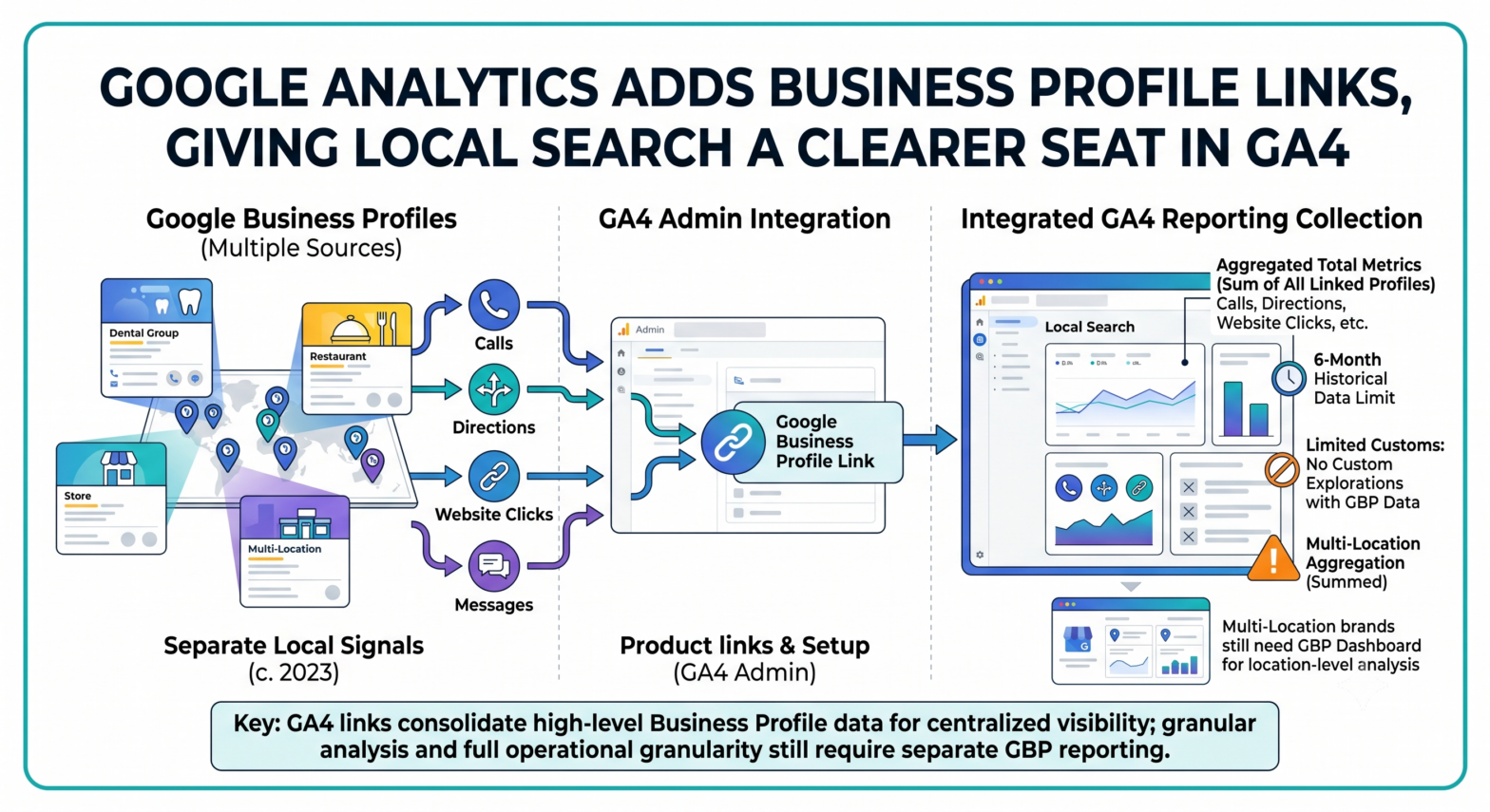
Local search has always been measurable. Just not in the same place as the rest of the customer journey.
Google is now letting businesses connect Google Business Profile data directly to a Google Analytics property, bringing Search and Maps engagement into GA4 reporting alongside website and app activity. For local businesses, franchises, healthcare providers, restaurants, service-area companies, and multi-location brands, the change gives Business Profile interactions more visibility inside the analytics stack.
Not all of the data comes with it.
Local Search Metrics Move Closer To GA4 Reporting
The new Google Business Profile link appears inside Google Analytics under Admin, in the Product links section. From there, eligible users can select one or more Business Profiles they manage and confirm the connection.
The permissions are straightforward. A user needs Editor or Administrator access for the Google Analytics property. They also need Owner or Manager permission for the Google Business Profile being linked.
Once the link is active, Google Analytics creates a dedicated Google Business Profile reporting collection. That collection appears only when a link exists.
The reports bring in aggregated Business Profile metrics including interactions, website clicks, calls, directions, messages, bookings, and menus. Google says those metrics help businesses see how users find and engage with them on Google Search and Maps, then view that activity beside website and app data.
For local SEO teams, that is the notable shift.
Business Profile data has usually sat in its own reporting workflow. GA4 handled site sessions, events, conversions, and traffic attribution. Business Profile performance handled calls, direction requests, profile interactions, and other local actions tied to Search and Maps. The new link does not merge those systems into one perfect local attribution model, but it moves a familiar gap into a more visible reporting environment.
That matters in a year when Google is placing more weight on integrated measurement. TechWyse recently covered how Google Analytics and Ads consent controls are being consolidated, reflecting a broader move toward fewer disconnected settings across Google’s marketing products.
The New Reports Are Useful, But They Are Not Location-Level
The most important limitation is aggregation.
If a Google Analytics property is linked to multiple Business Profiles, GA4 displays the sum of the metrics from all linked profiles. Businesses cannot segment or filter the Google Business Profile metrics by individual profile inside Google Analytics.
That is a serious constraint for multi-location reporting.
A regional dental group with 20 clinics may see total direction requests, website clicks, and calls across all linked locations. It will not be able to use the new GA4 collection to isolate one clinic’s Business Profile performance from another. A franchise brand may see broader local demand patterns, but not the location-level breakdown that store operators often need.
Google’s Business Profile performance dashboard still supports individual and multiple profile performance review, including data on how people discover a profile and what actions they take after finding it. The GA4 integration adds centralization, not full operational granularity.
There is another reporting wrinkle. Google says Analytics will show every available Google Business Profile metric, regardless of business type. That differs from the Business Profile performance dashboard, which hides metrics that are not relevant to a business.
A restaurant may expect menu data. A law firm may not. In GA4, the reporting surface may still show available metric cards even when certain actions are not meaningful for that category.
Clean reporting will require interpretation, not just linking.
Six Months Of Business Profile Data Sets A Hard Window
Google Business Profile metrics in GA4 are available for the last six months. If a user selects a longer Analytics date range, the Business Profile portion of the report is still limited to that six-month window.
That creates a different planning horizon from many website analytics workflows.
GA4 users often compare year-over-year performance, seasonality, paid media cycles, and long-tail content trends. Business Profile reporting inside GA4 will not support that same historical depth through this integration. Local actions can be reviewed over the available period, but longer-term local visibility analysis will still need exported Business Profile data, other reporting tools, or separate historical records.
The six-month window also reinforces a pattern across Google’s measurement products: advertisers and analysts are being pushed to manage reporting retention more intentionally. TechWyse previously reported on Google Ads reporting data retention limits, where older reporting data faces stricter availability rules.
Different product. Same operational message.
Teams that need durable local performance records should not assume every platform report will remain available indefinitely.
Custom GA4 Analysis Still Has A Wall Around GBP Data
The integration does not make Google Business Profile metrics fully available across GA4.
Google says GBP metrics cannot be used in custom explorations, comparisons, or filters. There are also no granular controls for selecting which specific Business Profile data points are shared. Linking shares the listed metrics. Subproperties are not supported.
That limits how analysts can use the data.
A marketer cannot build a custom GA4 exploration that filters Business Profile direction requests by campaign segment. A local SEO manager cannot compare website click behaviour from one Business Profile group against another inside the new collection. A data analyst cannot apply the same flexible GA4 exploration workflow used for web events to these local metrics.
The reports are closer to dashboard visibility than raw analytical freedom.
That does not make the integration minor. For many local businesses, Business Profile engagement is one of the clearest signals of commercial intent. Calls, directions, bookings, menu views, and website clicks often sit closer to offline revenue than a generic pageview. Placing those metrics inside GA4 can help teams discuss local presence with the same reporting language used for website and campaign performance.
But it is not a replacement for location-level local SEO reporting.
Local Seo Gets A Measurement Bridge, Not A Full Attribution Model
Google Business Profile has become more important as Search and Maps interactions absorb more customer decisions before a user ever reaches a website.
People compare hours, reviews, photos, services, booking options, menus, and directions directly inside Google surfaces. For many local searches, the website is only one part of the decision path. Sometimes it is skipped entirely.
That is why GBP data belongs in broader reporting conversations.
Google’s own Business Profile documentation says performance data includes views, searches, and actions from both organic search results and Google Ads. It also tracks interactions such as calls, website clicks, messages, bookings, menu clicks, and directions. Those are not soft awareness metrics. They show how users behave after a local listing appears.
TechWyse has tracked Google’s growing focus on local surfaces through changes such as video ads appearing in local pack tests and broader shifts in how Google’s AI search features use business information. Local visibility is no longer just a rankings question. It is a measurement question, a content accuracy question, and, for advertisers, increasingly a paid visibility question.
Practical implications for marketers and SEOs: businesses should treat the GA4 link as a reporting enhancement, not a full local attribution solution. It can help centralize Business Profile interactions, especially for teams already reporting from GA4, but multi-location brands still need separate location-level analysis. Agencies should verify permissions, document which profiles are linked, monitor the six-month data window, and keep exporting or archiving local performance data when long-term comparisons matter.
Setup Is Simple, But Governance Still Matters
Creating the link takes place inside GA4 Admin, under Product links, where users choose Google Business Profile links, select the profiles, review data sharing information, and confirm the link. A Google Analytics property can be connected to multiple Business Profiles.
Deleting the link also happens inside Google Analytics Admin. Google says the action requires Editor or Administrator rights on the Analytics property.
Those access requirements should not be treated as a formality. Business Profile data can reflect customer demand by location, category, and action type. Calls, direction requests, bookings, and website clicks can all be commercially sensitive, especially for competitive local markets.
Large organizations should decide who owns the connection: analytics teams, local SEO teams, paid media teams, or regional operators. Without that governance, profile links can become another hidden integration that appears in reports without a clear owner.
Address changes in Google Business Profile may also take a short delay before appearing in Google Analytics. That matters for businesses with frequent location updates, relocations, temporary closures, or seasonal operating models.
GA4 is becoming a more connected reporting hub. The new Google Business Profile link gives local search activity a more visible place in that hub, while keeping some of the most important operational details inside Business Profile itself.