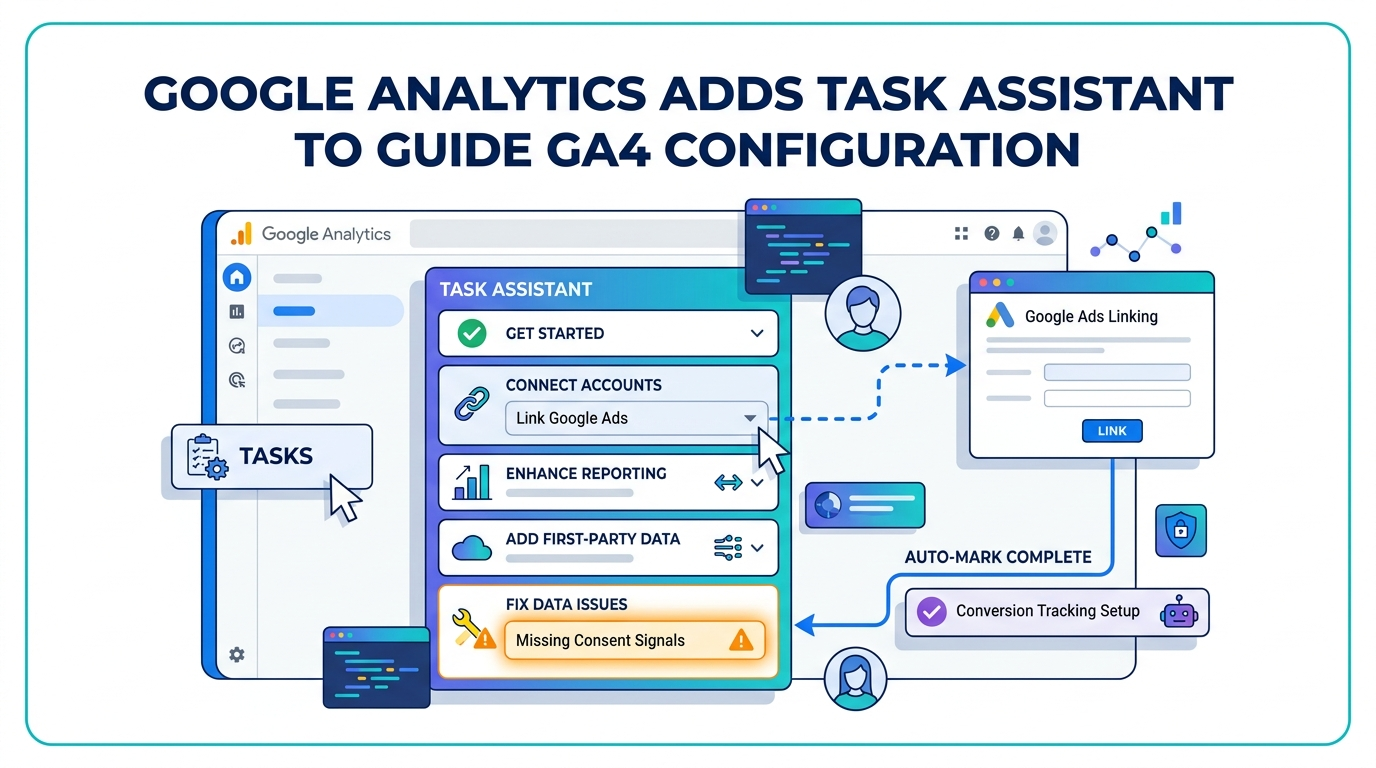
Google Analytics property administrators now have a built-in configuration guide to help identify and close setup gaps across their accounts. Google announced Task Assistant on April 29, 2026, describing it in its official What's New in Google Analytics documentation as a tool that "provides tailored recommendations to help you optimize your configuration and improve data collection."
What Task Assistant Does
Task Assistant, as detailed in Google's official release notes, organizes its recommendations into actionable categories, including connecting accounts, enhancing reporting, and fixing data issues. Specifically, Google groups tasks into six categories: Get Started, Connect Your Accounts, Enhance Your Reporting, Optimize Your Advertising, Add First-Party Data, and Fix Data Issues.
Within the Task Assistant dashboard, each task is expandable; clicking a task opens a guided flow that takes the user directly to the relevant settings panel within Analytics. Tasks can be marked complete when finished, or skipped when they do not apply to a given property's business objectives. Once a feature has been configured in the property, Task Assistant automatically marks the task as complete, without requiring users to check it off manually.
Where to Find It and Who Can Use It
Task Assistant is available from the left-hand navigation menu in Google Analytics, accessible by clicking "Tasks" near the bottom of the menu. Users with Administrator, Editor, or Marketer roles can use Task Assistant; users with only Analyst or Viewer roles cannot access the dashboard.
Google has announced the feature and documented it in the Help Center, but interface rollout timing can vary; users who do not yet see the tool are advised to check their permissions and property context first.
The Configuration Problem Task Assistant Targets
The feature targets a problem that has persisted since the transition to Google Analytics 4: many properties remain incompletely configured, with missing consent signals, absent Google Ads links, and conversion tracking that has never been validated. A property can be installed and still be missing key events, audience definitions, privacy checks, Google Ads linking, first-party data inputs, or cleanup steps for low-quality traffic, meaning businesses often assume they are measuring performance correctly when the underlying setup is incomplete.
Task Assistant's guided steps are also directly tied to newer Google Analytics features. Cross-channel budgeting, for instance, requires properly configured conversion tracking with values and sufficient historical data, and a property that has skipped campaign data import cannot use that budgeting feature meaningfully.
Access Restrictions and Rollout
The feature may not yet be available to all Google Analytics properties, as the Google Analytics team is actively working to expand access. Users with questions about eligibility are advised to reach out to their support team.
For marketers and analytics teams managing GA4 properties, Task Assistant provides a structured starting point for reviewing configuration health, particularly for organizations that recently migrated to GA4, manage multiple properties, or rely on GA4 audiences and conversion data to support Google Ads campaigns. The tool does not replace a full analytics audit; it does not substitute for deeper validation of event strategy, conversions, consent setup, integrations, and reporting logic.
According to Google's documentation, users can "return back to the Task Assistant for additional tasks," indicating the tool is intended as a persistent reference rather than a one-time setup wizard.