


Apple’s creative apps are moving beyond AI-generated assets into AI-operated workflows. An October 27 announcement introduces document assistants and external-agent access alongside editing tools, with Apple Creator Studio updates scheduled for November.
The distinction matters for teams producing campaign materials. Generating a graphic, revising a presentation and allowing software to change a spreadsheet involve different levels of access and oversight.
Model Context Protocol Brings External Agents Into Documents
Apple is adding context-aware assistants powered by Apple models and OpenAI to Keynote, Pages and Numbers. New Model Context Protocol support will let external agents read content, edit documents, and execute actions within those apps, according to Apple’s announcement.
The assistant and the connection serve different purposes. One provides help inside the application. The other gives compatible external software a route into the work itself.
Model Context Protocol already connects AI systems with software functions elsewhere. TechWyse’s coverage of the WordPress MCP Adapter describes the same underlying distinction: a connection exposes capabilities that an agent can discover and use, rather than simply adding a chatbot.
For marketing teams, document access introduces an operational consideration. A presentation may contain unpublished plans; a spreadsheet may include client information or financial assumptions. Allowing an agent to revise those materials requires a different approval process from asking it to draft text in a separate conversation.
Final Cut Pro Reduces the Distance Between Editing Tools
Final Cut Pro for Mac will integrate MotionVFX content and let editors send timeline images to Pixelmator Pro, with changes saved back automatically. The Content Hub will also add stock video.
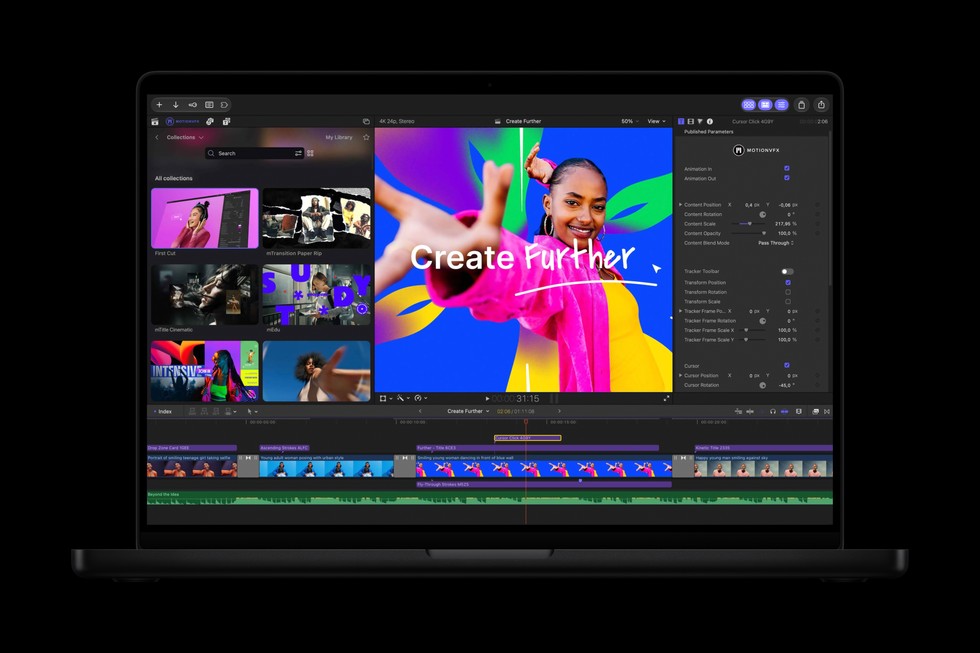
These additions build on an editor that already includes visual and transcript search, automatic captions, object tracking and automatic reframing. Apple’s Final Cut Pro product documentation describes those existing capabilities separately from the forthcoming update.
That distinction helps establish what is actually changing. The November announcement expands access to effects, media and connected image editing; it does not introduce AI-assisted editing to Final Cut Pro for the first time.
For a team adapting one campaign across several formats, the relevant change is the handoff. An image correction can remain connected to the video project rather than becoming a separate export-and-reimport task. That is a workflow improvement, not evidence of a measured reduction in production time.
AI Image Editing Moves Into an Existing Layered Workflow
Pixelmator Pro’s forthcoming Generate Fill feature will let users describe changes to selected image areas and retain generated elements on editable layers.

The application already supports nondestructive editing, masks, adjustment layers and vector tools. Its existing editing controls allow designers to revise individual elements without rebuilding an entire composition.
That places the generative feature inside a conventional production environment. A prompt can initiate a change, while layers and selection tools preserve a route for further adjustment.
The approach also reflects a broader development in AI image editing. TechWyse previously examined how Google Pics combines natural-language changes with control over individual image elements.
For marketers, the practical implication is more flexibility during revision. Generated imagery still needs checks for product accuracy, brand consistency, usage rights and suitability for the intended placement. Editable output makes correction possible; it does not establish that the first result is publication-ready.
November Availability Comes With Separate AI Requirements
The update will be free for existing subscribers. Apple’s Canadian announcement lists subscriptions at C$ 17.99 monthly or C$ 179 annually.
The beta document assistants require Apple Intelligence-capable devices running iOS 27, iPadOS 27 or macOS 27 or later. They support U.S. English only. MCP requires macOS 27 or later.
Subscription access and feature eligibility are therefore separate questions.
The bundle itself spans video, image and music production, alongside premium features in Apple’s productivity apps. Apple’s Creator Studio subscription information confirms that Keynote, Pages, Numbers and Freeform retain free versions. Existing standalone Mac applications also remain available through one-time purchases.
The subscription terms distinguish finished work from continued access to paid tools. Content created during an active subscription remains licensed within the original creation. Keynote, Pages, Numbers and Freeform documents remain editable after cancellation, but subscribers cannot make new edits using paid features.