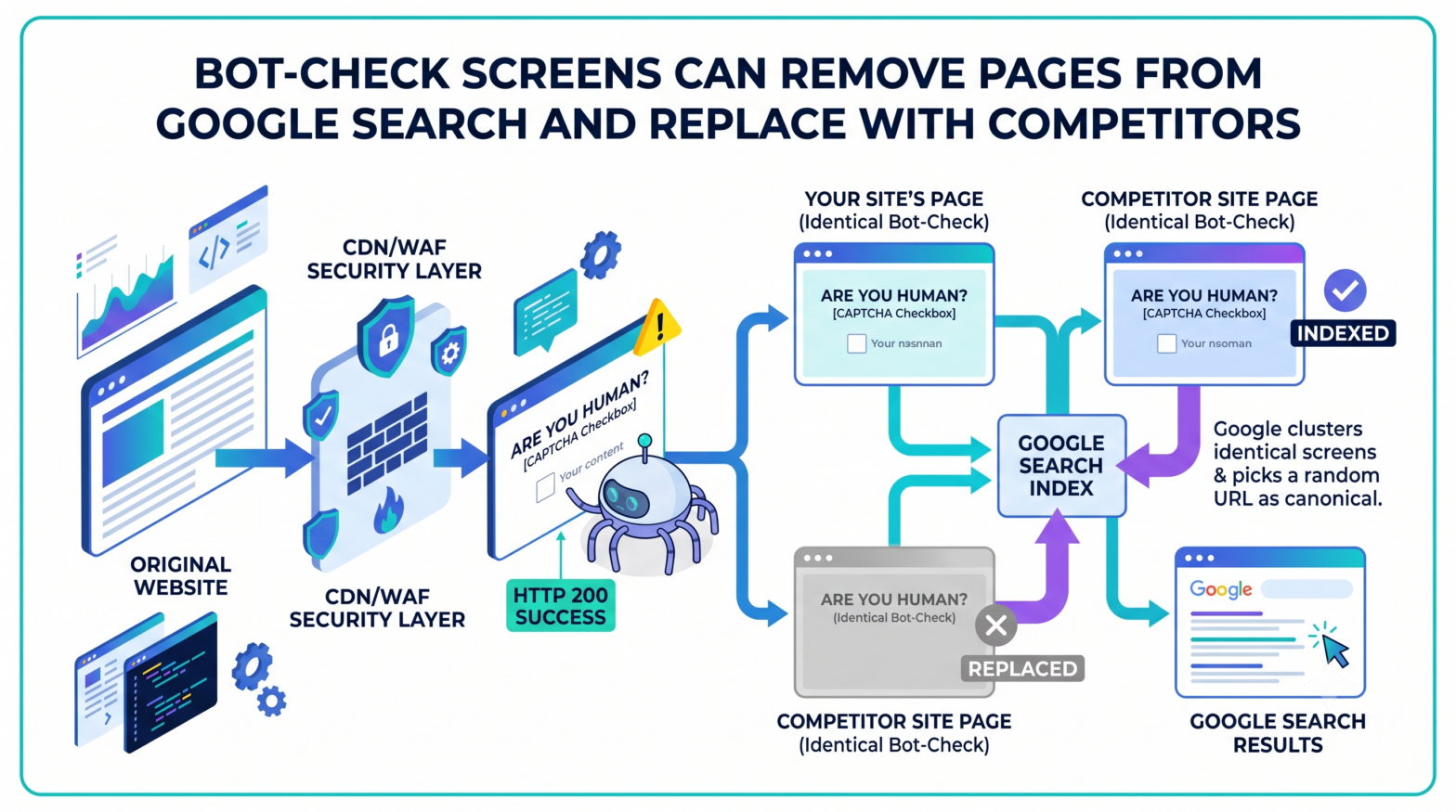
Pages protected by "are you a bot" interstitials can be quietly removed from Google's search index, not because they are broken, but because Google successfully crawls them and indexes the wrong content. Google Search Advocate John Mueller addressed this directly on a recent episode of Search Off the Record, Google's official podcast, explaining that bot-verification screens served to Googlebot can trigger a cross-site duplicate canonicalization problem that pushes a site's own pages out of search results.
How the Interstitial Becomes the Indexed Page
When a site's security layer flags a visitor as suspicious, it displays an "are you a bot" verification page instead of the real content. In some cases, this page is returned to Google with a standard HTTP 200 success status code, as if it were normal content, leading Google to index it. The result is that the site's real content drops from the index or is replaced by this interstitial.
The problem compounds because bot-check screens are not unique to any one site. Because the same interstitial appears across many different websites, Google encounters several pages that look nearly identical. When it detects duplicate-looking content, Google selects one URL as the canonical version and treats the others as duplicates. This affects not only indexing but also which page Google recognizes as the authoritative version of the content, and it may select a URL from a different website entirely, causing the original site's page to be marked as a duplicate.
This is not a theoretical edge case. Google's own Search Central Blog addressed the broader mechanism in its December 2024 post on CDNs and crawling, describing the scenario as a "soft block." Google identified this class of problem as particularly harmful: if a CDN serves an error message with an HTTP 200 status code and Google equates it to a hard error, the URL is removed from search. If Google cannot detect it as a hard error, all pages with the same error message may be eliminated as duplicates from the search index. Google's Search Central Blog explicitly noted that a similar problem arises when a CDN displays "are you sure you're a human" interstitials.
Why the Problem Is Difficult to Detect
Mueller explained that tracing this issue is difficult because it requires first examining the URL Google selected as canonical and then working backward to determine what caused the problem. A typical site visitor would never encounter the bot-check prompt, so a manual review of the site reveals nothing wrong.
The failure is also invisible to standard uptime monitoring. Because the request completes successfully from the server's perspective, the instinct to look for a broken page is not useful. Google is able to reach the site and receive a valid HTTP response; the issue is that it is receiving the wrong content. This is why standard checks that do not account for what Googlebot actually sees will not catch the problem.
The interstitial may not be served from the website's own code at all. Mueller noted that it can be triggered by a CDN, hosting provider, or a separate bot-protection layer, and that this type of protection can activate specifically when crawl traffic picks up. According to Google's Search Console documentation, because Googlebot often makes more requests than a human user, it can trigger these protection systems, causing them to block Googlebot and prevent it from crawling the site.
How to Identify the Issue in Google Search Console
Diagnosing this problem requires checking Google Search Console directly, as the site itself will appear to function normally. The Page Indexing report flags affected pages as duplicates or as canonicalized to another URL. The URL Inspection tool reveals which address Google has selected as the canonical version. If that address belongs to a different website, the site owner should investigate immediately.
Google's canonicalization troubleshooting documentation confirms that the URL Inspection tool is the correct starting point for identifying which canonical page Google has chosen. Even after the underlying content issue is resolved, Google may keep pages in a duplicate cluster for up to two weeks. Pages will generally be separated faster if the difference between the corrected content and the other clustered pages is clear and significant.
Resolving the Issue and Requesting Re-Crawl
Site owners who encounter this problem should contact whoever manages their security service, CDN, or web hosting provider to investigate a fix. To help security providers identify legitimate crawler traffic, Google and other search engines publish their IP address ranges specifically to help site owners identify their crawlers and, where appropriate, remove those IPs from Web Application Firewall rules or add them to an allowlist.
Google's Googlebot documentation also notes that the HTTP user-agent string used by Googlebot is frequently spoofed by other crawlers, making it important to verify that a request actually originates from Google. The recommended method is a reverse DNS lookup on the source IP, or matching it against Google's published Googlebot IP ranges. This distinction matters when configuring allowlists in a WAF or CDN: allowlisting based on the user-agent string alone does not confirm the request is from Google.
Once the content issue is corrected, site owners can use the Request Indexing feature in the Search Console URL Inspection tool to ask Google to re-evaluate the affected pages. Because this feature is subject to quotas, it should be reserved for the most important URLs.
For marketers and SEOs, the practical implication is that bot-protection services, including CDN-level WAFs and third-party DDoS mitigation tools, should be tested for their behaviour under elevated crawl rates, not just under normal visitor traffic. Pages showing "Duplicate without user-selected canonical" or "Google-selected canonical different than user-declared canonical" in the Page Indexing report, particularly where the Google-selected canonical points to an external domain, warrant immediate investigation of the site's security and CDN configuration.
Google's Search Central Blog stated directly in its December 2024 guidance on CDNs and crawling:
"If you need your site to show up in search engines, we strongly recommend checking whether the crawlers you care about can access your site."