Google has expanded Gemini's role inside Chrome for enterprise users, adding autonomous task automation and a new layer of AI-related security controls. In its April 22 Google Cloud Blog post published alongside Google Cloud Next 2026, Google confirmed that Auto Browse through Gemini in Chrome is now available for eligible Workspace users in the United States.
Auto Browse Brings Agentic Task Execution to the Browser
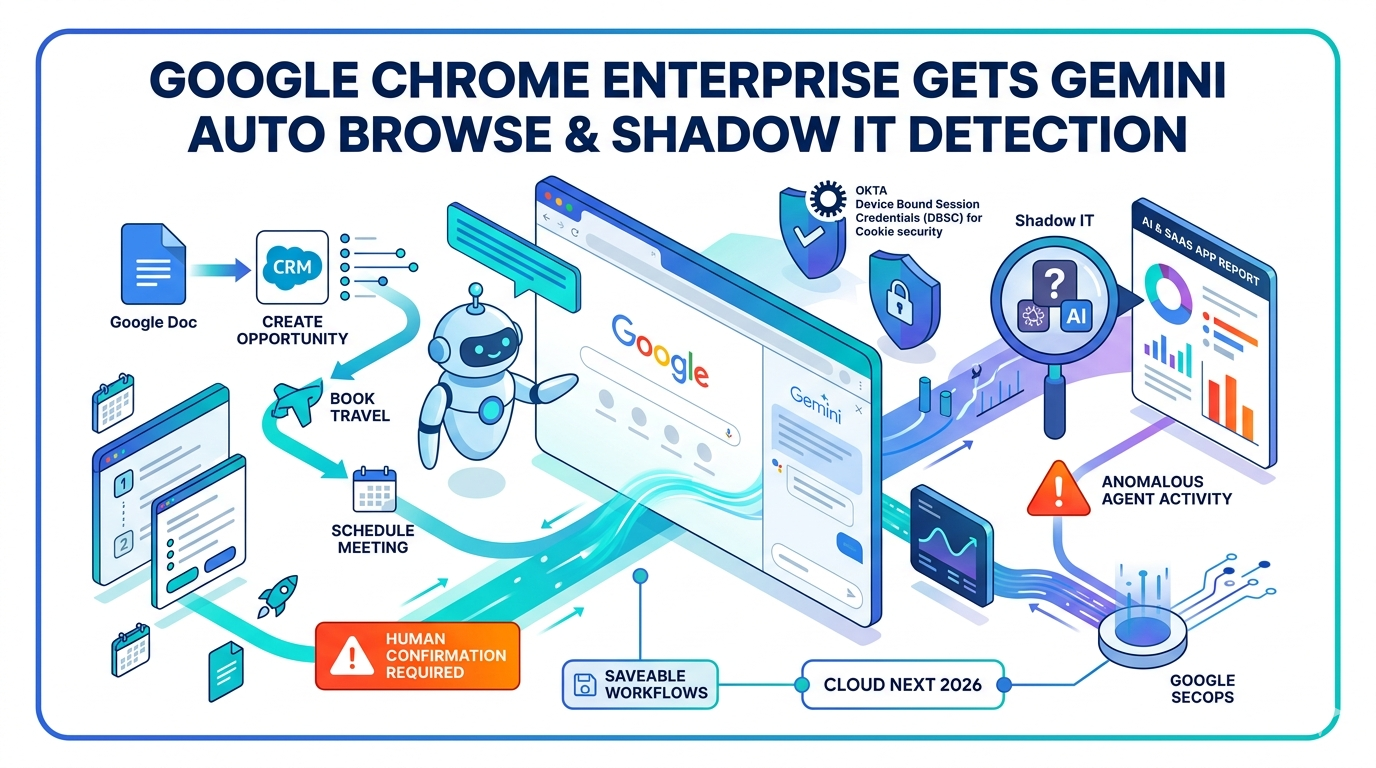
Auto browse through Gemini in Chrome is now available for eligible Workspace users in the U.S. The agentic capability leverages the browser to understand the live context of open tabs, allowing Gemini to automate complex web-based work like booking travel, inputting data, or scheduling meetings.
Google's April 22 Cloud Blog post illustrates one scenario: asking Auto Browse to create a new opportunity in a preferred CRM tool based on content in a Google Doc, including pulling in relevant company information and creating associated contacts.
The feature is not designed to operate without human oversight. Auto browse is designed to pause and explicitly ask for confirmation, or for the user to complete certain tasks, such as making a purchase or sending an email, before any final action takes place.
Workspace customers in the U.S. can turn on the new Gemini Auto Browse capabilities in Chrome Enterprise. Auto browse handles multi-step tasks across the web and apps, with checkpoints along the way to keep users in control. Existing Workspace enterprise-grade protections remain in place, keeping work and data confidential to the organization.
The feature can be enabled via policy. Google also stated that an organization's prompts will not be used to train its AI models, a data-use commitment that has become a standard enterprise requirement as AI tools proliferate across the workplace.
Saveable Workflows Extend Automation Across Teams
Every organization manages standard operating procedures that involve gathering information and repeating the same tasks each day. Auto browse's Skills feature allows organizations to orchestrate and deploy agentic automation across teams and workflows, for example, creating a skill to automate invoice reviews by comparing new invoices against existing ones stored in the inbox to identify discrepancies.
Skills can be built collaboratively and shared across a team, and can be invoked anywhere Gemini is used in Workspace.
Chrome Enterprise Gains Shadow IT and Anomalous Agent Detection
Alongside the Auto Browse launch, Google announced new security capabilities targeting unsanctioned AI tool use inside organizations. Chrome Enterprise Premium already provides visibility into sensitive data transfers and allows IT teams to block unsanctioned AI tools. Many organizations, however, struggle to identify risky behaviour from compromised extensions or AI services. Chrome Enterprise now surfaces advanced extension telemetry, empowering IT teams to detect and respond to anomalous agent activity.
Google also announced new Shadow IT risk detection, which will soon be available in Chrome Enterprise. Via a GenAI and SaaS app report, IT teams will gain visibility into the usage of both sanctioned and unsanctioned generative AI and SaaS sites across their organization, allowing administrators to detect Shadow IT and Shadow AI risks.
IT teams will also receive a "Gemini Summary" of Chrome Enterprise release notes and AI-powered suggestions for their fleet. The module will surface critical changes, new policies, and upcoming deprecations relevant to their specific deployment, and will generate recommendations such as configuring new settings or reviewing managed browsers.
All extension telemetry data flows into Google SecOps and other SIEMs, providing expanded visibility into potential data loss risk.
Okta Partnership Expands, MIP Integration Added
Google's partnership with Okta to secure the agentic enterprise includes new updates. To reduce session hijacking, one of the most common vectors for data theft, Okta is launching Device Bound Session Credentials (DBSC) in Beta on Windows to secure the Okta end-user dashboard. DBSC cryptographically binds authentication sessions to a device's secure hardware, rendering stolen cookies useless.
Google's Device Trust Connector now enables Okta to ingest Chrome's real-time posture checks, including a new Antivirus check signal, while new extensible SSO for macOS streamlines authentication for Apple users.
Google also confirmed it is upgrading security controls for browser extensions and introducing Microsoft Information Protection (MIP) integration, which is intended to help organizations enforce consistent data security policies across their environments.
Practical Implications for Enterprise IT and Security Teams
For organizations already using Google Workspace, enabling Auto Browse through Chrome Enterprise policy controls gives IT administrators direct governance over which user groups can access Gemini's agentic capabilities. The human-in-the-loop confirmation requirement means individual users retain final approval over automated actions, a distinction that will matter during internal AI governance reviews and compliance assessments. The Shadow IT detection capabilities introduce a layer of visibility into AI tool usage that did not previously exist at the browser level, which may prompt organizations to formally audit their current AI tool landscape before the feature reaches general availability.
Google used Cloud Next 2026 to reposition Chrome from a browser into what it is calling an intelligent workplace platform, adding agentic capabilities for multi-step autonomous tasks, a persistent Gemini side panel integrating with Gmail, Calendar, and Drive, saveable AI workflows called Chrome Skills, and enterprise security controls governing how employees interact with AI tools.