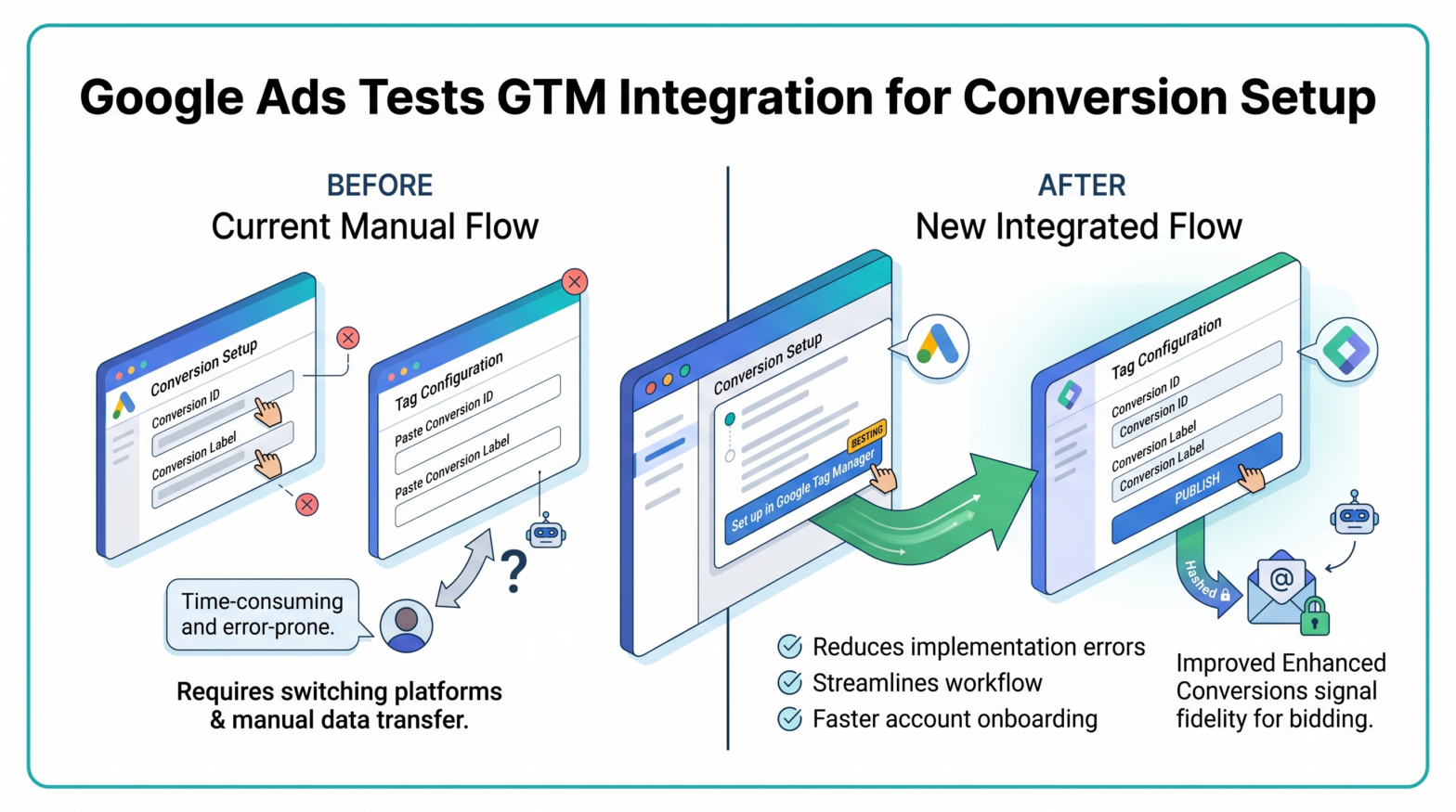
Google Ads advertisers may soon be able to configure conversion tracking tags inside Google Tag Manager without leaving the Google Ads interface. The feature, currently in testing, was first reported by PPC News Feed in mid-April 2026.
What Google Is Testing
Google Ads is testing a new "Set up in Google Tag Manager" option within its conversion setup flow. The feature appears alongside existing installation methods and allows advertisers to push conversion tracking setups directly into Google Tag Manager.
The new option adds a "Set up in Google Tag Manager" button to the conversion setup flow inside Google Ads. According to screenshots and reporting from industry observers, clicking the button opens a pre-filled tag configuration within GTM so advertisers no longer need to copy conversion IDs and labels manually between platforms.
No official announcement has been published on the Google Ads blog or Google Search Central Blog confirming a broader rollout. The feature remains an observed test as of the date of this report.
How the Current Manual Process Works
Under the existing setup documented in Google's Tag Manager Help pages, to set up Google Ads conversion measurement, advertisers must enter the required Google Ads Conversion ID and Conversion Label, and an optional Conversion Value, Transaction ID, and/or Currency Code, a process that requires switching between platforms and transferring credentials by hand.
At the "Tag setup" section, users click "Use Google Tag Manager," copy their Conversion ID and Conversion Label, then add those values obtained from Google Ads into the Tag Manager fields. The Conversion ID is unique per Google Ads account, while the Conversion Label is unique per conversion action. This manual copy-and-paste workflow introduces room for input errors and is a recognized friction point in campaign onboarding.
What the New Flow Changes
Based on early screenshots, the flow prompts users to select a GTM container and then surfaces a suggested tag configuration ready to publish. The pre-filled configuration eliminates the need to manually transfer identifiers between the two platforms.
This could be especially useful for agencies managing multiple clients, teams working across multiple containers, or advertisers with complex tagging setups.
Accuracy and Data Quality Implications
Conversion tracking accuracy directly affects how Google Ads allocates budget and optimizes bids. Reliable conversion tracking is the foundation of automated bidding strategies and accurate ROAS calculations. By reducing implementation errors, this integration should improve the fidelity of conversion signals feeding into Google's learning systems, improving bid models and campaign decisions.
For advertisers using enhanced conversions, the quality of tag configuration is particularly consequential. Enhanced conversions for web is a feature that can improve the accuracy of conversion measurement. It supplements existing conversion tags by sending hashed first-party conversion data from a website in a privacy-safe way, using a secure one-way hashing algorithm called SHA256 on first-party customer data, such as email addresses, before sending to Google. Misconfigured tags in this context can disrupt that data pipeline.
Practical Implications for Advertisers and Agencies
For paid media managers and agencies, a native push-to-GTM button would reduce the technical overhead associated with new account onboarding and conversion action creation. The pre-filled tag configuration would still require review before publishing, particularly for setups involving custom data layers, e-commerce transaction variables, or multi-container environments. The GTM push from Google Ads should be treated as a recommended starting point, not a final configuration. Reviewing the suggested tag details before publishing and ensuring analytics and attribution layers are aligned remains necessary. Google has not confirmed a public release date or whether this test will be expanded to all accounts.