
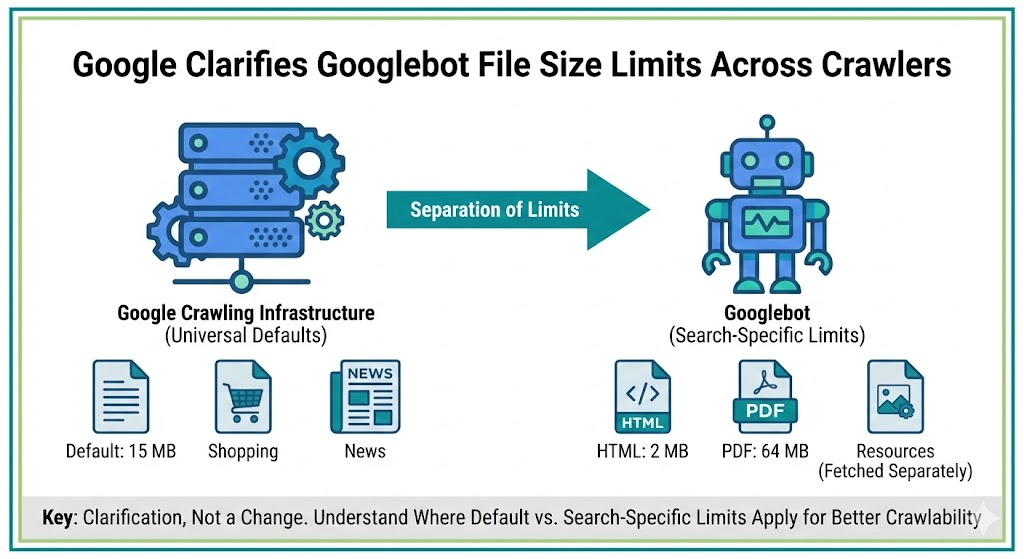
Google has updated its official documentation to clarify how file size limits apply across its crawling infrastructure, separating universal crawler defaults from Googlebot-specific rules.
The change doesn’t introduce new limits or crawling behavior. Instead, it reorganizes where the information lives and explains which limits apply to all Google crawlers versus those specific to Google Search.
For technical SEO teams managing crawl budgets, large pages, or heavy templates, the clarification helps explain why oversized files may not be fully processed.
Default Limits Now Apply To All Google Crawlers
Google moved the general file size limits out of the Googlebot page and into its broader crawling infrastructure documentation.
According to the updated crawler overview, Google’s crawlers and fetchers have a default file size limit of 15 MB.
This limit applies across Google products, not just Search. That includes systems powering Google News, Shopping, Gemini, AdSense, and other services that rely on the same crawling infrastructure.
Google said the previous placement on the Googlebot page caused confusion because the limits were never exclusive to Googlebot.
Googlebot Search Limits Are More Specific
While the infrastructure docs list a 15 MB default, the Googlebot documentation now specifies tighter limits for Google Search crawling.
The page outlines:
-
2 MB for HTML and supported text-based files
-
64 MB for PDFs
These figures apply when Googlebot crawls content specifically for Search indexing.
Google also notes that individual resources referenced in HTML, such as CSS and JavaScript, are fetched separately rather than counted as part of the main document size.
In practice, this means very large HTML files may not be fully processed, even if additional assets load correctly.
This Is A Documentation Update, Not A Ranking Change
Google described the update as a clarification rather than a behavioral shift.
The limits themselves are not new. The 15 MB default was first documented publicly in 2022, and Google representatives previously confirmed the restriction had existed for years before it appeared in help documentation.
No changes were announced to crawling, indexing, or ranking systems.
The update simply separates:
-
Infrastructure-wide defaults
-
Googlebot Search-specific limits
This makes it easier for developers to understand which constraints apply in different contexts.
Why File Size Still Matters For SEO
Even without a policy change, file size can affect how much of a page Google actually processes.
Oversized HTML documents may be truncated, which can lead to:
-
Missing content not being indexed
-
Structured data not being read
-
Late-loaded elements being ignored
-
Crawl budget inefficiencies
Large template-heavy pages, excessive inline scripts, or bloated markup can push files beyond recommended thresholds.
For publishers and ecommerce sites especially, keeping primary HTML lean helps ensure important content appears early in the document and gets fully crawled.
Practical Steps For Technical Teams
To stay within safe limits, teams should consider:
-
Reducing unnecessary inline code
-
Deferring non-critical scripts
-
Breaking extremely long pages into logical sections
-
Optimizing CMS templates
-
Keeping key content high in the HTML
While Google hasn’t changed the rules, cleaner, lighter pages remain easier for both crawlers and users to process.
The Bigger Picture
This update continues Google’s recent effort to separate general crawling infrastructure from Search-specific documentation.
Over the past year, Google has moved more technical guidance into standalone crawler docs that apply across multiple products.
Expect additional reorganizations as Google introduces more AI-driven and specialized crawlers.
For SEOs, the takeaway is straightforward: the limits aren’t new, but understanding where they apply can help diagnose crawling and indexing issues faster.