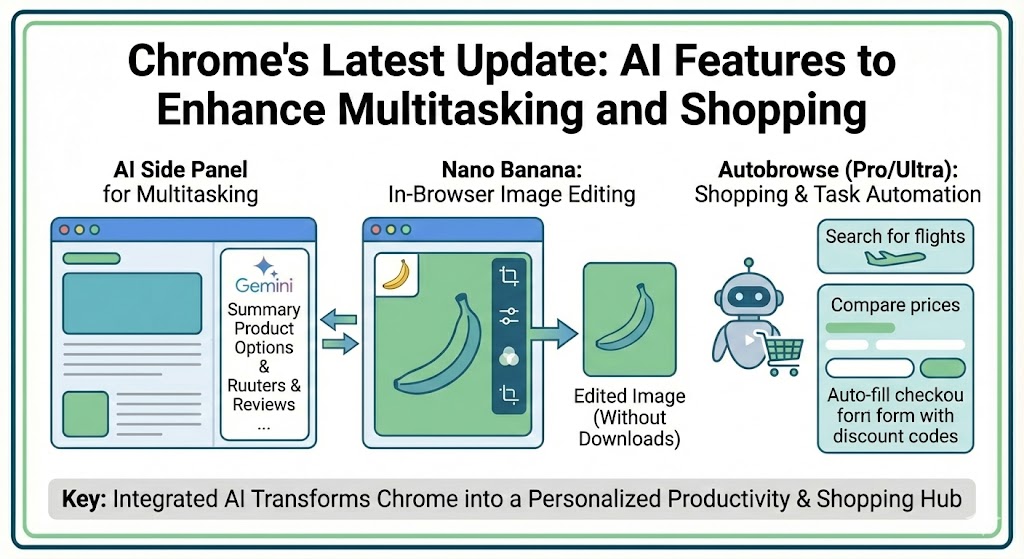
Google Chrome has launched a major update that integrates Gemini AI across various functionalities, enhancing multitasking, image editing, and personalized browsing for users.
AI Side Panel for Multitasking
The newly introduced side panel in Chrome allows users to interact with Gemini AI without switching between tabs. This feature streamlines tasks like comparing options or reviewing product feedback across websites, all while remaining within a single browser window.
Nano Banana: Image Editing in Browser
Another exciting feature is Nano Banana, an in-browser image editing tool. Users can now make changes to images directly in Chrome, without needing to download or upload files. This provides a seamless, quick solution for image adjustments during browsing.
Autobrowse: Personalized Shopping and Task Automation
For Pro and Ultra subscribers, Autobrowse brings agentic AI to automate tasks. This AI can search for hotels, flights, and services, make price comparisons, and even add items to shopping carts. It can also manage account logins and apply discount codes for a smoother shopping experience.
Expanded Google Features
Additionally, Chrome integrates with more Google services, including Google Calendar, Gmail, Google Shopping, and YouTube, bringing more personalized AI experiences that are designed to understand user intent.
Conclusion
These updates reflect Chrome’s ambition to evolve beyond a simple browser into a more integrated, personalized productivity hub powered by AI. The new AI features are poised to enhance users’ browsing experience, making it faster and more interactive.