

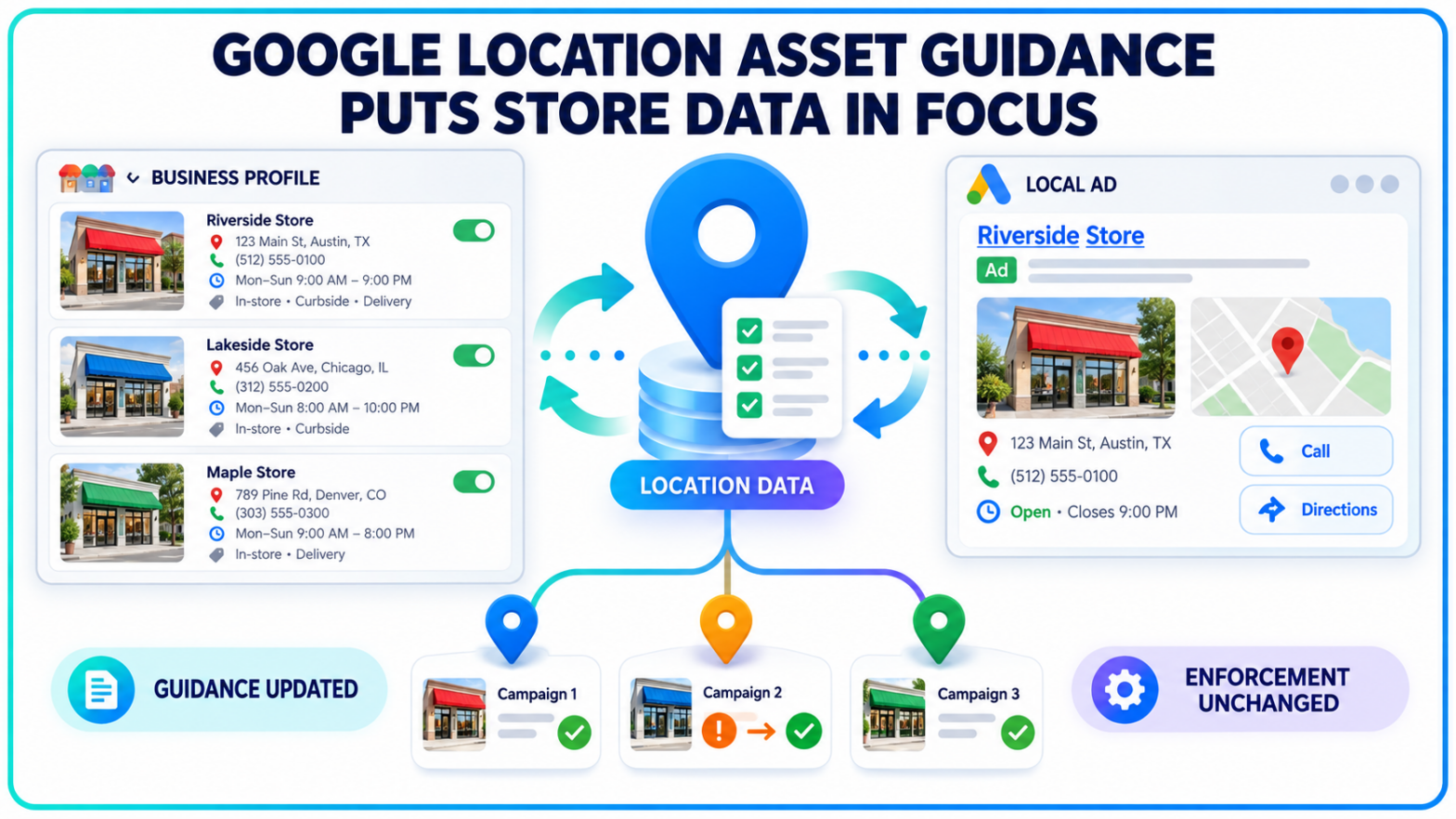
An ad can be accurate while the store details attached to it are wrong. For a local business, that mismatch can send a customer to a closed branch, an outdated phone number or a location that does not offer the advertised service.
Google has revised its location asset requirements to make those problems easier to diagnose. The update changes terminology, readability and troubleshooting guidance. It does not introduce a new policy, enforcement standard or compliance deadline.
No countdown. No crackdown.
Google Changed the Instructions, Not the Rules
Google updated its location asset documentation twice in 2026, first in June and again in September. In a policy notice posted September 8, the company said the revisions were made to update terminology, improve readability and add troubleshooting steps.
The company was equally direct about enforcement. The update “does not change enforcement of this policy.”
Advertisers are not being asked to satisfy a new set of eligibility requirements by a particular date. Existing disapproval standards continue to apply, including rules governing location ownership, recognized physical addresses and the connection between the advertised product and the selected location.
The distinction is important because a rewritten policy page can look like a policy change even when the underlying rules remain untouched. Here, Google is giving advertisers a clearer account of how location information is sourced, why an asset may be rejected and where corrections must be made.
Business Profile Supplies More Than an Address
Location assets can add an address, map, phone number, business hours, ratings, distance information and directions to an ad. Depending on the campaign and device, users may also see a clickable call button or a location detail page with photos.
Those details can appear across Search, Maps, YouTube and parts of the Display Network. Location assets also work with Performance Max and can support store-visit conversion measurement for eligible accounts.
Much of that information does not originate inside Google Ads.
Google’s location asset documentation says business information is sourced from Google Maps and Google Business Profile. Addresses, phone numbers, hours, merchant photos and videos may all flow into an advertiser’s campaigns through the linked location source.
A marketer correcting ad copy therefore may be looking in the wrong place. If a phone number, opening time or image is inaccurate, the edit often belongs in the Google Business Profile or Maps listing rather than the ad account.
Updates can also take time to move between systems. Google says changes to chain locations and Business Profile data may require up to a day to appear in Google Ads.
The Location Must Match What the Ad Is Selling
Google’s requirements focus on the relationship between the advertiser, the physical location and the product or service promoted.
A business cannot advertise a location without the explicit approval of its owner. The location must be recognized by Google and cannot be permanently closed. It must also belong to the business running the ad or be an eligible affiliate location where the advertised product or service is available.
That final condition can create trouble for multi-location businesses.
A healthcare network may offer a particular treatment at two clinics but not at a third. A retailer may carry a product category in selected stores only. A home-services company may have offices with different service territories. Linking every location to every campaign can produce an asset that is technically connected to the account but commercially inaccurate.
Google’s examples make the standard plain: an advertiser cannot attach a store that does not sell the product shown on the landing page.
Business names can cause disapprovals as well. If a location asset is rejected for improper capitalization, punctuation or symbols, Google instructs advertisers to correct the name in Business Profile, then unlink and relink the profile so the revision can synchronize with Google Ads.
Phone numbers are separately verified to confirm that they represent the promoted business.
Account-Level Locations Can Reach the Wrong Campaign
Location assets can be added at the account, campaign or ad-group level. That flexibility also creates room for configuration errors.
When an advertiser connects a Business Profile at the account level, its locations can become eligible across the account. Location groups and filters can then limit particular campaigns or ad groups to selected branches. Campaign-level settings override broader account settings.
Without that filtering, a campaign built for one region, store type or service line may be paired with an unrelated location.
Consider a retailer with 30 stores and three regional promotions. Linking the full location set is only the first step. Each campaign still needs the correct subset of stores, and those stores must carry the promoted offer. The same problem applies when locations open, move, temporarily close or stop providing a service.
Google also distinguishes between owned locations and affiliate locations. Businesses advertising stores they operate directly should use the appropriate owned-location source. Manufacturers and service providers promoting products through third-party retail chains should use affiliate locations. Declaring the wrong type can leave the asset disapproved.
That configuration has broader consequences for local advertising. Google increasingly uses store locations, local actions and offline signals within automated campaign systems. Poor location data can affect not only what appears beside the ad, but also which physical outcomes an advertiser can measure and optimize.
Multi-Location Campaigns Need a Consistency Review
The practical response is not a rushed policy remediation project. It is a review of the information moving between Google Business Profile and Google Ads.
Advertisers should compare each branch’s address, phone number, operating hours, status and service availability with the corresponding website location page. Business names should follow Google’s formatting requirements, while photos and videos should be checked for accuracy and suitability before they appear in paid placements.
Inside Google Ads, the review should confirm that the correct Business Profile or location source is linked, the ownership request has been approved and the intended location type is selected. Location groups, labels and campaign-level settings then need to match the geographic scope and offer behind each campaign.
Images deserve their own check. Google can use merchant photos from Business Profile in local ads, and advertisers who do not want those images included can opt out through Location Manager. A dated storefront photo or image from the wrong branch may otherwise become part of the paid experience.
Marketers should also verify what happens when a location closes. A branch marked temporarily or permanently closed in Business Profile will stop appearing as a location asset. That prevents users from being directed to the closed site, but it can also remove coverage from campaigns that were built around that branch.
For businesses managing Google Ads location assets across many stores, the highest-risk problems are often ordinary ones: an old phone number, inconsistent hours, a missing label or a campaign linked to all locations by default.
Google’s September revision gives advertisers clearer steps for tracing those issues to their source. The approval standards remain the same, and the company has set no new deadline for reviewing accounts.