
Google Tag Manager users will now see changes to how their containers transmit measurement data to Google's advertising and analytics products. Google confirmed in its October 12, 2026 Tag Manager release notes that GTM containers can be optimized to send data directly to supported Google destinations, removing the need to load a separate gtag.js JavaScript file for those connections.
The Old Architecture and What It Caused
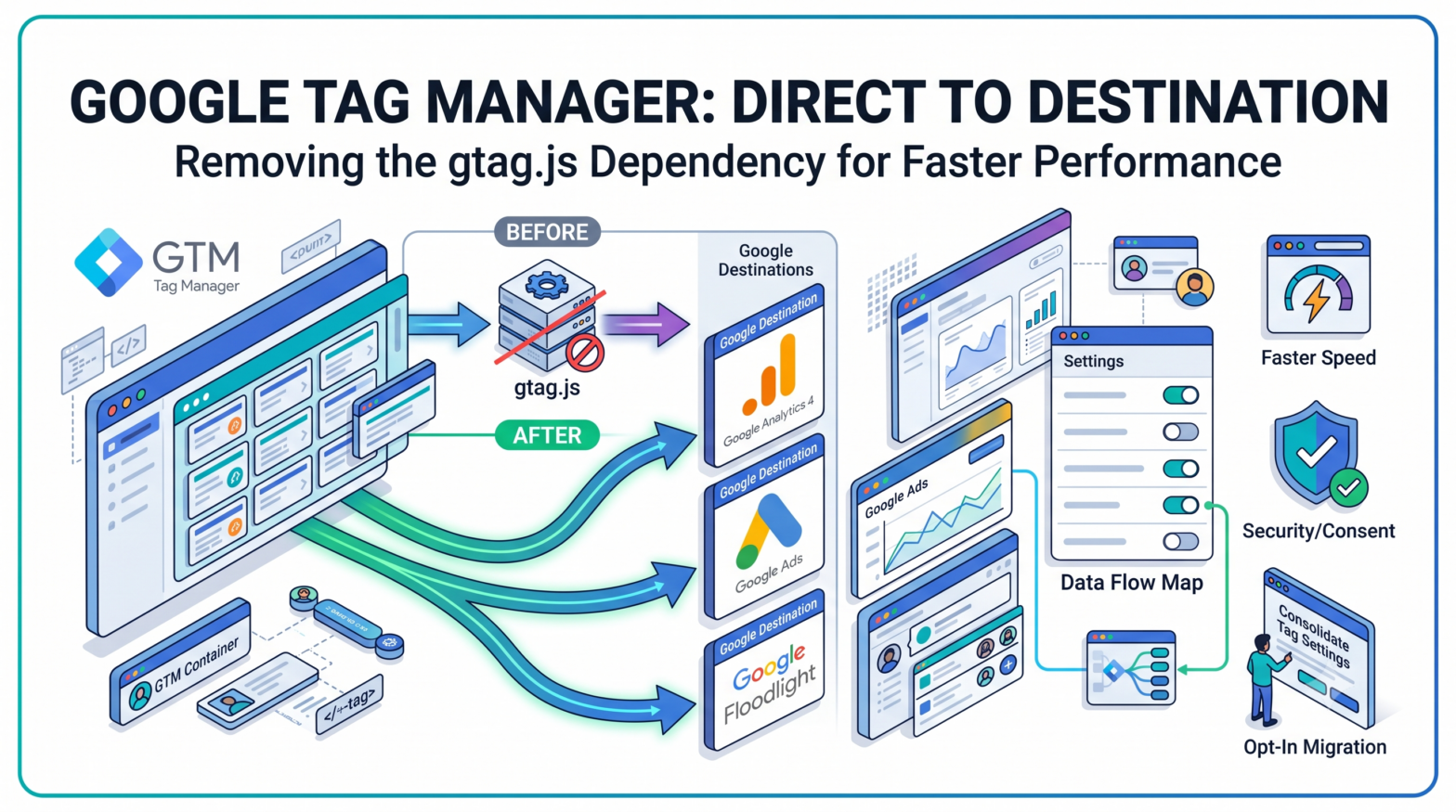
Previously, Google Tag Manager loaded extra JavaScript, specifically gtag.js, to send data to a Google destination, which could cause latency in measurement transmission. The Google tag that was loaded also had its own settings and permissions, which sometimes made troubleshooting difficult and could result in fragmented diagnostics.
Under the updated model, each Google destination, including GA4, Google Ads, and Floodlight, gets its own tag inside the container, and the container sends data directly to those destinations. This removes the separate gtag.js load per destination and routes measurement through the single container JavaScript file, reducing bandwidth and browser resource use.
What the October 12 Release Enables
The October 12 release introduces a new capability for GTM containers to send data directly to Google measurement products, resulting in faster website performance, improved data collection, and centralized settings management and user access within the GTM container.
There is now a clear relationship between destinations and tags, which makes diagnostics more consistent and easier to troubleshoot.
A new Settings tab within the GTM interface will serve as the central location for container-wide configuration. Google-related configuration moves into that Settings section, which contains container-wide settings alongside a data flow map showing the Google destinations to which those settings apply.
Optimization Is Opt-In, Not Automatic
Container optimization is opt-in. Google says it is recommended but that no changes will be made automatically, and that users with edit, approve, or publish permissions can start the flow from an in-account banner and preview every proposed change before publishing to their workspace.
Optimized containers move Google tag settings into the new Settings tab and leave event tags unchanged.
For containers where all existing Google tags share identical settings, users can confirm the consolidated setup with a single review step. Where Google tags carry conflicting settings across multiple configurations, users are guided through a conflict-resolution flow to select which settings to apply before the migration is finalized.
Permissions Implications of Optimization
Optimization establishes account links between the container and its Google destination accounts automatically, with Read access granted by default. Those permissions are adjustable afterward through Tag Manager's user management. It is worth noting that permissions are not versioned, meaning they cannot be rolled back through workspace version history the way tag configurations can.
The change adds no automatic data collection, does not alter in-page behaviour, and is reversible.
Part of a Broader GTM Unification
The October 12 container optimization capability is one component of a larger architectural shift Google announced at Google Marketing Live on May 20, 2026. An August 20, 2026 announcement detailed a series of updates to the Google tag and Google Tag Manager designed to streamline measurement setup, improve performance and management, and provide a more unified experience across Google's tagging products.
As part of that broader update, Google tags are being upgraded into fully capable Google Tag Manager containers, meaning websites currently using only Google tags will gain access to Tag Manager features such as interface-driven tagging, debugging, and version control. Google says the upgrade will not change how existing Google tags behave on webpages, and that each Google destination will retain its own tag, preserving existing setups and automation event triggers.
Practical Implications for Marketing and Analytics Teams
For teams managing measurement across Google Ads and Google Analytics 4, the container optimization flow offers a path to consolidating what have historically been separate tag configurations into a single managed environment. Advertisers operating containers with wildcard custom event triggers should review their setup before publishing any optimization changes, as config commands now surface in the dataLayer as visible gtag.config events, and if a Google Tag Manager container uses wildcard custom event triggers, this change may cause those tags to fire. Teams should use GTM's built-in Preview mode to validate behaviour before submitting any workspace changes to production.
Google confirmed in the October 12, 2026 Tag Manager release notes that the capability to optimize containers and learn which Google destinations are supported is documented in GTM's official help center under "Optimize your Google Tag Manager container."