
A policy warning can erase campaign delivery before a team realizes which ad is responsible. Google Ads is consolidating account and creative restrictions in a Policy Summary designed to show advertisers what is blocked, how serving is affected and what should be fixed first.
The new interface brings account-level requirements and creative violations into one workflow. More importantly, it orders some of those issues by performance, turning policy compliance into a form of campaign triage.
The Policy Summary Separates Account Risk From Creative Risk
Google’s new Policy Summary is available through the Admin section of Google Ads under Policy and Summary in accounts with the updated navigation.
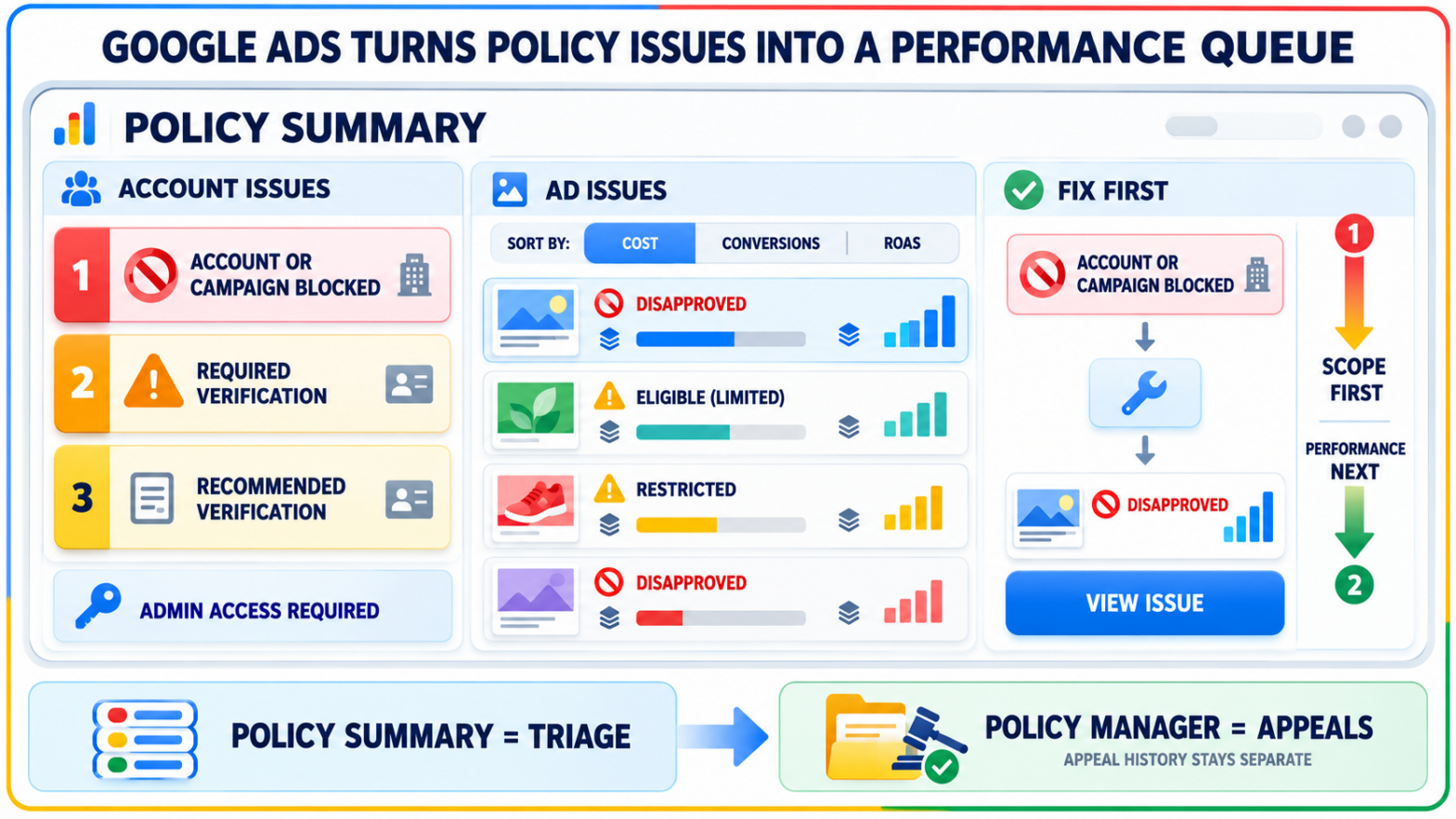
According to Google’s Policy Summary documentation, the page provides an overview of restrictions, issues and alerts affecting both the advertiser’s account and its ad creatives. Each issue includes the reason for the restriction, its effect on ad serving and recommended resolution steps.
The interface is divided into two main areas.
The Account issues card covers restrictions and requirements that apply at the customer-account level. These can include problems capable of preventing an account or campaign from serving, as well as required and recommended verification tasks.
The Ad issues card covers policy problems affecting ads and other creative assets. Violations are grouped into policy families, giving advertisers a consolidated view of related errors without requiring them to inspect individual campaign and asset tables.
That distinction matters. A disapproved creative may interrupt one campaign, while an unresolved verification or account restriction can affect a much larger portion of the advertiser’s activity.
Google’s existing notifications already alert users to billing, campaign and policy problems. The Policy Summary goes further by organizing compliance work around the scope and impact of each issue.
Google Ads Policy Issues Can Now Be Ranked by Performance
The most consequential change is how Google prioritizes creative violations.
Ad issues can be sorted using the performance metric selected by the advertiser, with affected creatives listed in descending order. The updated interface observed in Google Ads includes options such as cost, conversions and return on ad spend.
For large accounts, that changes the order in which policy work can be handled.
An agency managing thousands of creatives may have multiple restricted or disapproved ads at any given time. Previously, identifying which violation posed the greatest immediate business risk could require moving between campaign tables, policy details, email notifications and reporting data.
The Policy Summary places performance context beside the policy problem. An advertiser can therefore identify whether a violation affects a low-volume experiment or a creative responsible for a substantial share of conversions.
Performance is not the only measure of urgency. Google says account-level tasks follow a separate hierarchy: issues preventing an account or campaign from operating come first, followed by required verifications and then recommended verifications.
A high-performing ad with a restriction may deserve quick attention, but an account-wide serving block still takes precedence.
The distinction is especially useful following unexpected mass ad disapprovals, when advertisers must determine whether the problem is isolated, technical or widespread across the account.
Admin Access Is Now Part of the Compliance Workflow
The centralized view does not mean every Google Ads user can resolve every issue.
Google says most account-level tasks require Admin access. Users without the necessary permission will see those actions greyed out and must contact an account administrator or request a higher access level.
That creates an operational consideration for agencies and businesses with divided responsibilities. A paid media specialist may discover an urgent verification task but still be unable to complete it. The person with the required access could sit with the client, finance team or another agency department.
Recommended tasks can be dismissed temporarily, but dismissal does not clear them. Google says dismissed items return when the Policy Summary is refreshed or opened again. Completed tasks can be reviewed in the History section of the Account page.
For marketers, the practical implication is straightforward: account access should be audited before a policy emergency occurs. Teams need to know who holds Admin permissions, who is authorized to submit verification information and who can approve changes to ads or landing pages.
That preparation becomes more important as advertiser identity and compliance history influence where ads can serve. Google’s expanded Limited ad serving policy, for example, considers factors that include account maturity, policy history and advertiser verification status.
Policy Manager Still Handles Appeals and Their History
The Policy Summary does not eliminate Google Ads Policy Manager.
Google continues to direct advertisers to Policy Manager through Tools, Troubleshooting and Policy Manager when they need to submit or track certain appeals. Its Appeal history tab records the status and results of current and previous cases.
Under Google’s policy appeal guidance, an advertiser can appeal after correcting an ad or destination, or when the advertiser believes the original decision was incorrect. The two appeal reasons available in Policy Manager are “Dispute decision” and “Made changes to comply with policy.”
The difference between the tools is functional.
Policy Summary is the triage layer. It presents account and creative problems, explains their serving impact and helps determine which issue deserves attention first. Policy Manager remains the case-management layer for appeals and their outcomes.
Advertisers should avoid treating the new dashboard as a reason to submit appeals more aggressively. Google limits each ad to three unsuccessful appeals before support intervention is required. It also advises advertisers to wait at least 24 hours before appealing the same ads or campaigns again, since duplicate or excessive submissions can interrupt processing.
Since July 21, 2026, policy decisions more than six months old have no longer been eligible for direct in-account appeals. Those cases must be taken to Google Ads support.
Centralization Does Not Change Google’s Advertising Policies
The Policy Summary reorganizes enforcement information. It does not introduce a new advertising policy, alter the review standard or guarantee that a restricted ad will return to full eligibility.
A disapproved ad still cannot serve until the violation is corrected and the ad passes review. An ad marked Eligible (limited) may continue serving only in locations, formats or audiences permitted by the applicable policy.
The volume of enforcement behind those labels is substantial. Google reported blocking or removing more than 8.3 billion ads and suspending 24.9 million advertiser accounts in 2025, while expanding AI-driven enforcement across its advertising systems.
Centralized policy tracking will not prevent incorrect classifications or eliminate the need to investigate landing pages, targeting settings and creative claims. It gives advertisers a clearer place to begin that investigation.
Google’s documented priority order remains explicit: account or campaign blockers appear before required verification, required verification appears before recommended verification, and creative issues are ordered by the performance measure the advertiser chooses.